
Can accessories be organized into categories?
Yes! Accessories can be organized into categories (and so can kits!). This is ideal if you have many different types of accessories and you want to group together similar types. In Reftab, you can click on these categories to filter and display only the accessories belonging to the selected category. This feature enhances the organization of your inventory, making navigation easier for you.
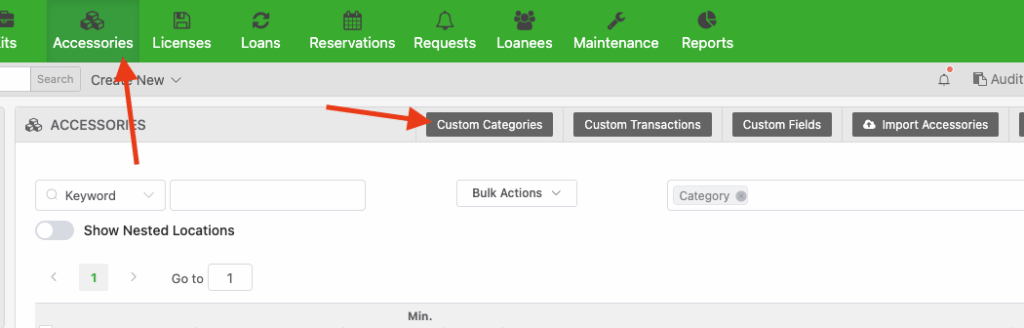
Step 1) Click “Accessories” > “Custom Categories“
Step 2) “New Category” and give your category a name and click “Submit“

Step 3) Next click on any of your existing accessory items or create a new accessory
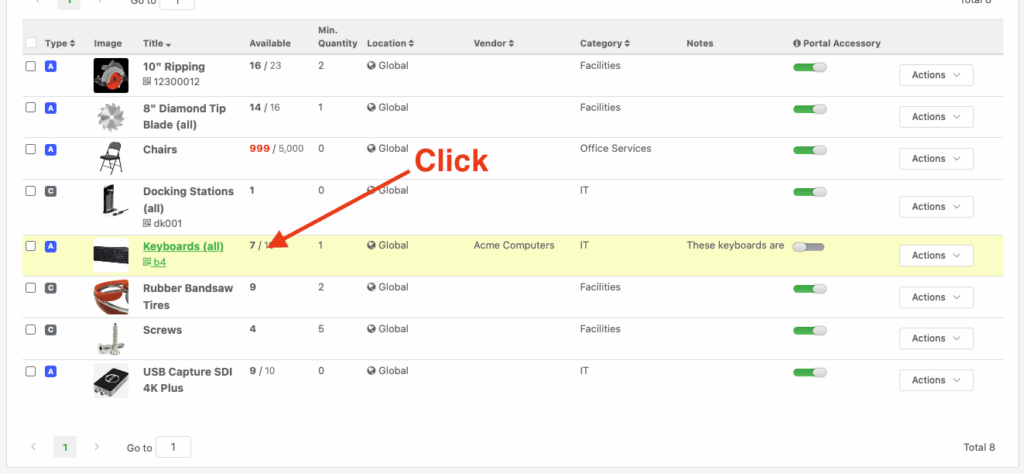
Step 4) Click “Edit” (If you’re creating a new category, skip to next step)

Step 5) Set your category and click “Save Accessory“

Step 6) Click on your category from the left side menu.
(Optionally use the column selector to show your categories in a column)
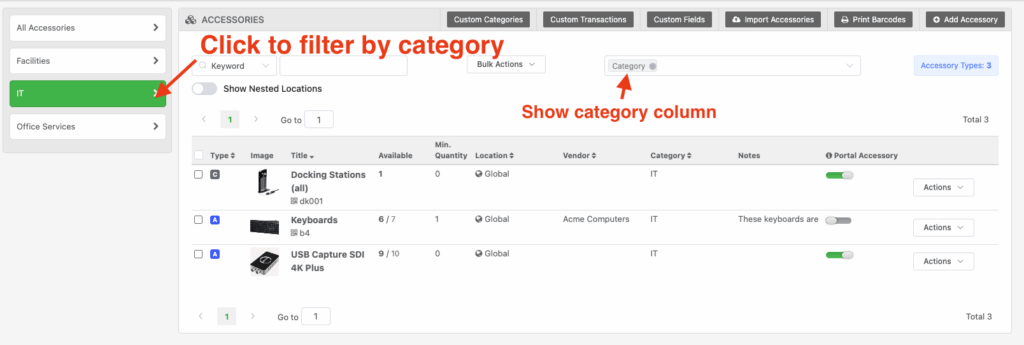
That’s it! Now your accessories can be grouped by category. You can click the “All Accessories” button at the top to view all accessories in one table. Also note this same procedure can be done for kits as well.
As of writing this article there isn’t a method to bulk change multiple accessories into a category, this process will need to be done manually for each accessory. However, our team will introduce bulk updates in a future update.
Start tracking your assets in minutes. Free forever.
50 assets free forever with unlimited inventory & software tracking. Includes email alerts, mobile apps, reports, custom asset tags and more.