
An Overview of Reftab’s Recent Updates to Software Asset Management
Software is too critical—and too costly—to manage haphazardly. Reftab’s latest updates give you greater control, reduce unnecessary spend, and enforce standardization across your software environment. Without a strong SAM initiative, your organization is exposed to risk, inefficiency, and disruption. That’s why we’ve enhanced our software tracking capabilities: to help you take control, demonstrate strategic value, and make software asset management a top priority for driving business success.
This guide will showcase:
- Applications vs. Licenses
- Reftab’s Application Knowledge Base
- License Renewals
- License Surveys
- Installed Software
- Vendors
Applications vs. Licenses
Prior to this update, Reftab tracked licenses as a flat list, with no way to show which licenses belonged to a specific application or to associate properties with that application, such as owners, security compliances, or data storage regions. With this update, we’ve introduced Applications as a higher-level category to provide better organization and context for your licenses.
- Applications represent the publisher (for example, Adobe, Microsoft, Zoom etc.)
- Licenses capture detail about what was purchased such as seats, renewal dates, costs, associated PO numbers, etc.
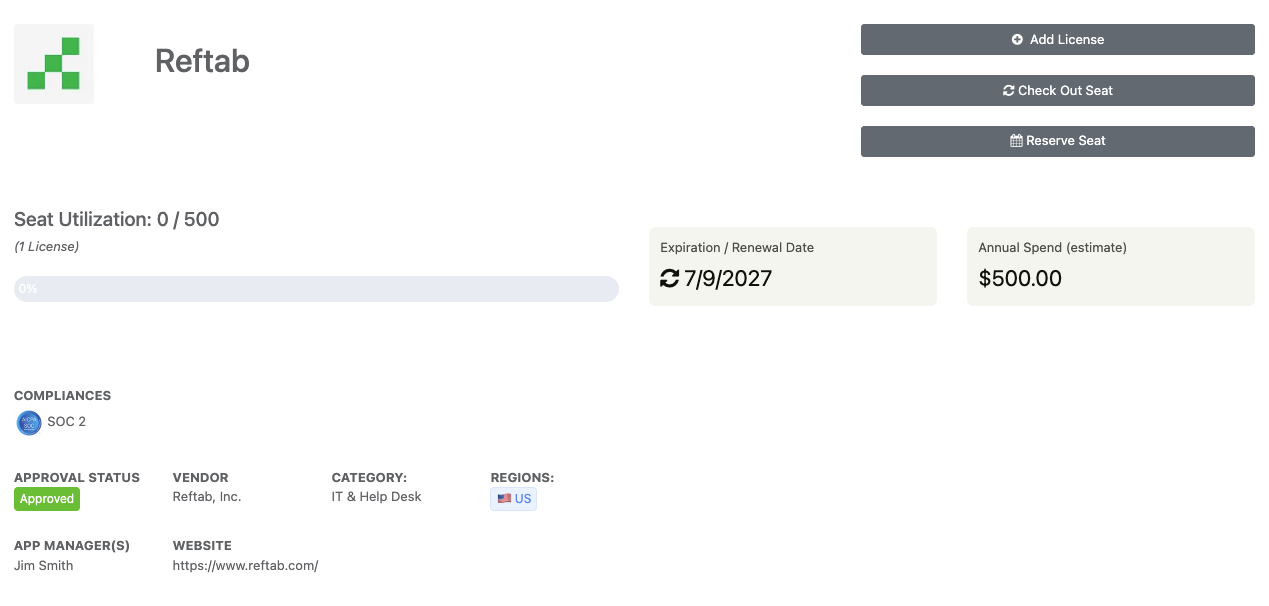
Applications can store data such as:
- Category – This represents the type of software – “Finance”, “Security”, “Video Editing”, “HR & Payroll”, etc..
- App Owners – These individuals understand the business use cases for specific applications and work with IT to verify usage trends, assess risks, and identify optimization opportunities.
- Vendor – You can link a vendor record that stores more details about the app such as contacts, etc.
- Status – This is used to set what stage the application is within its lifecycle, such as “Discovered”, “Approved”, etc.
- Website – The url address of the software.
- Compliances – Use this to store the compliance certifications for the application, such as “SOC 2”, “ISO” etc..
- Regions – The geographical location where your data is stored with the app.
Licenses store data such as:
- Billing cycles – Monthly, yearly, one-time, etc.
- Product keys
- Seats purchased – The quantity you set here is what you can use to “check out” a seat to users or assign to hardware assets.
- Cost information – This can cost per seat or total costs.
Once you have the license saved and you’ve included details such as cost per license seat and renewal dates, etc., the system will automatically build graphs to visualize both spend and potential savings. Furthermore, if you link the license to your SSO provider via our integration with Entra or Okta, you’ll see a graph showing active logins.
(Note that licenses can store customized fields. You can create as many fields as you need to.)

Reftab’s Application Knowledge Base
In order to improve the UX for our users and make adding applications simple. We’ve built a knowledgeable of applications and vendors. Simply start typing, and if you see the application you’re looking for, select it and fields will auto populate as well as the logo of the application.

Note: You do not have to select a vendor from the knowledge base. You can save your own, custom application anytime.
License Renewals
We’ve also introduced a page for license renewals. This is a simple timeline showing all license renewals within 6 months.

When you’re ready to renew a license, click on any license in the renewal timeline and you’ll be taken to the license page. Click “Renew now” on the notice

You’ll be taken through a wizard showcasing your current/past subscription period and your renewal subscription period.
This is where you’ll review and rightsize any needed data such as costs, seat counts, dates, etc.

When you click “Proceed to Renewal” you can enter any changes to the upcoming period. For example, if you purchase more seats, you can adjust the seat count. If the cost changes, you can also adjust the cost. Click “Save to Billing History” when done.
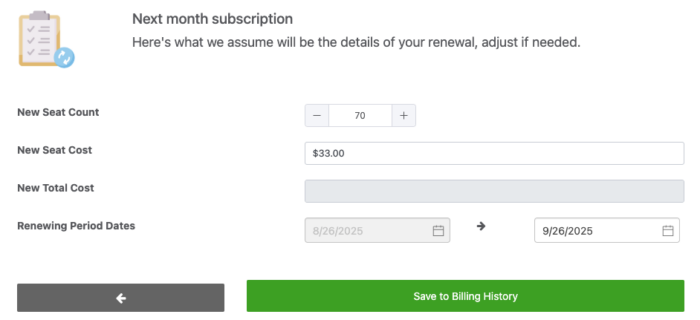
Once you submit, you’ll see the data saved to your “Billing history” tab. You’ll also see your cost tracking graph update automatically showing actual spend vs potential spend.

Billing history tab shows records of the software’s subscription dates and costs:

License Surveys
This page showcases a list of all the surveys that were sent to users assigned to a license. For more information on how to setup and use license surveys click here.
Surveys are a great way to keep on top of your users so that you’re informed of their need and use case for their license. If someone responds “no” they don’t need a license, then that’s an opportunity for you to optimize costs and reclaim license seats. If they respond “yes” they still need the license, then that also is a way to better capture hard evidence for future budgeting.
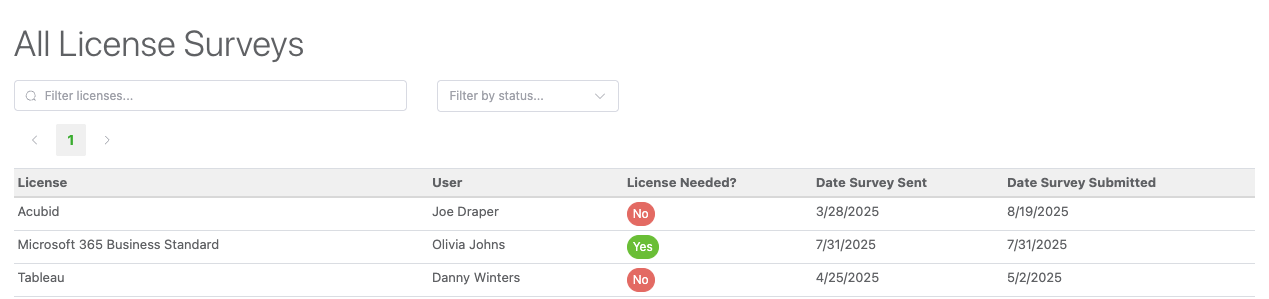
Click on any survey and it will bring up their submitted responses:

Installed Software
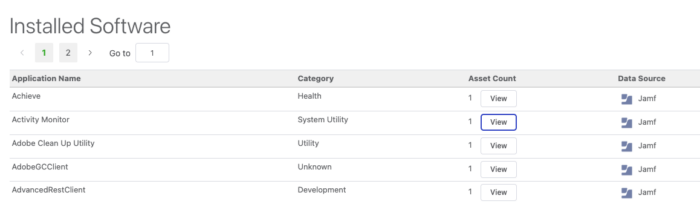
By integrating Reftab with Jamf, Intune or NinjaOne, you can pull installed software on each endpoint. This page shows a list of all installed software and their assets. You can click the “View” button to show the assets with that software.
Vendors
We’ve also introduced a vendor system in Reftab. As of writing this post, vendors can be connected to multiple applications. This is where you can store key details about your vendors such as contact information, notes, etc.
Note: Our knowledge base can also be used when creating a new vendor to auto populate general information such as names, websites and address information.

Automating the Process with SaaS Discovery
Organizing applications and licenses is powerful on its own, but the real value comes when the process is automated. By integrating Reftab with Microsoft 365 or Okta, you can automatically sync all your SaaS licenses.
Instead of manually tracking which users have which seats, Reftab discovers them for you. Your licenses sync in real time, giving you immediate visibility into usage without the overhead of manual updates.
Need help? We're here for you
For any questions or assistance, feel free to reach out to us.
Ready to simplify IT asset management?
No credit card. No watered-down trial. Create a free account and see firsthand what Reftab can do.