
How to Automate Employee Offboarding and IT Asset Recovery
Table of contents

When an employee leaves your company, disabling their account is usually one of the first things IT needs to do. But that’s only part of the offboarding process.
What about their laptop? Their monitors? The phone they were issued two years ago? Or the equipment that’s sitting at their home office?
Someone needs to know what they have, what’s been returned, and what still needs to be collected.
For IT teams managing dozens or hundreds of employees, keeping track of all this manually can get complicated pretty quickly.
The good news is that employee offboarding and IT asset recovery can be automated, so your team isn’t starting from scratch every time someone leaves.
Disabling an Employee Doesn’t Mean Offboarding Is Complete
Most organizations already have a process for disabling employee accounts through an identity provider like Microsoft Entra ID (formerly Azure AD) or Okta.
Once an employee is disabled, their access to connected systems can be restricted according to your organization’s identity and access policies.
But there’s an important distinction between disabling an account and completing the employee’s offboarding.
Disabling a user doesn’t tell you whether their equipment has been returned.
IT still needs to answer questions like:
- What laptops, monitors, phones, or other equipment are assigned to this employee?
- Has the equipment been returned?
- Is anything still outstanding?
- Have other required offboarding tasks been completed?
- Who handled the equipment return, and when?
Without a central place to track these tasks, it’s easy for things to get missed.
And even if equipment is successfully recovered, there may not be a record showing when it happened or who completed the work.
Start With an Accurate Record of Assigned Equipment
Before you can automate asset recovery, you need to know what equipment employees actually have.
This is where having a centralized IT asset management system becomes useful.
Instead of searching through spreadsheets, help desk tickets, or old emails, IT should be able to pull up an employee and see the equipment assigned to them.
For example, an employee might have:
- A laptop and docking station
- Two monitors
- A company phone
- A headset
- Other accessories or equipment
When that person leaves, those assignments become the starting point for your equipment recovery process.
This is also why keeping your hardware inventory up to date matters. If equipment isn’t assigned to the correct employee, it may never make it onto the offboarding checklist.
Automatically Create Offboarding Tickets When Employees Leave
One of the simplest ways to improve employee offboarding is to connect it to the systems your IT team already uses.
For example, Reftab integrates with Microsoft Entra ID and Okta through SCIM provisioning.
Reftab has long supported automatically disabling users when their accounts are disabled through a connected identity provider. This keeps user records synchronized and can trigger notifications and other workflows.
We’ve recently expanded this functionality to take things a step further.
Reftab can now automatically create an offboarding ticket when a user is disabled through Microsoft Entra ID or Okta.
Instead of only updating the employee’s status, Reftab can generate an offboarding ticket that identifies their assigned equipment and outlines the tasks that need to be completed.
This means IT has an actionable checklist rather than just a notification that someone has left.
The ticket can be used to track equipment returns, confirm other offboarding requirements, and record the progress of the employee’s departure.
Track What’s Been Returned and What’s Still Outstanding
Creating the offboarding ticket is only the beginning.
The real benefit comes from having a way to track the work as it gets completed.
Let’s say an employee leaves and has a laptop, two monitors, and a company phone assigned to them.
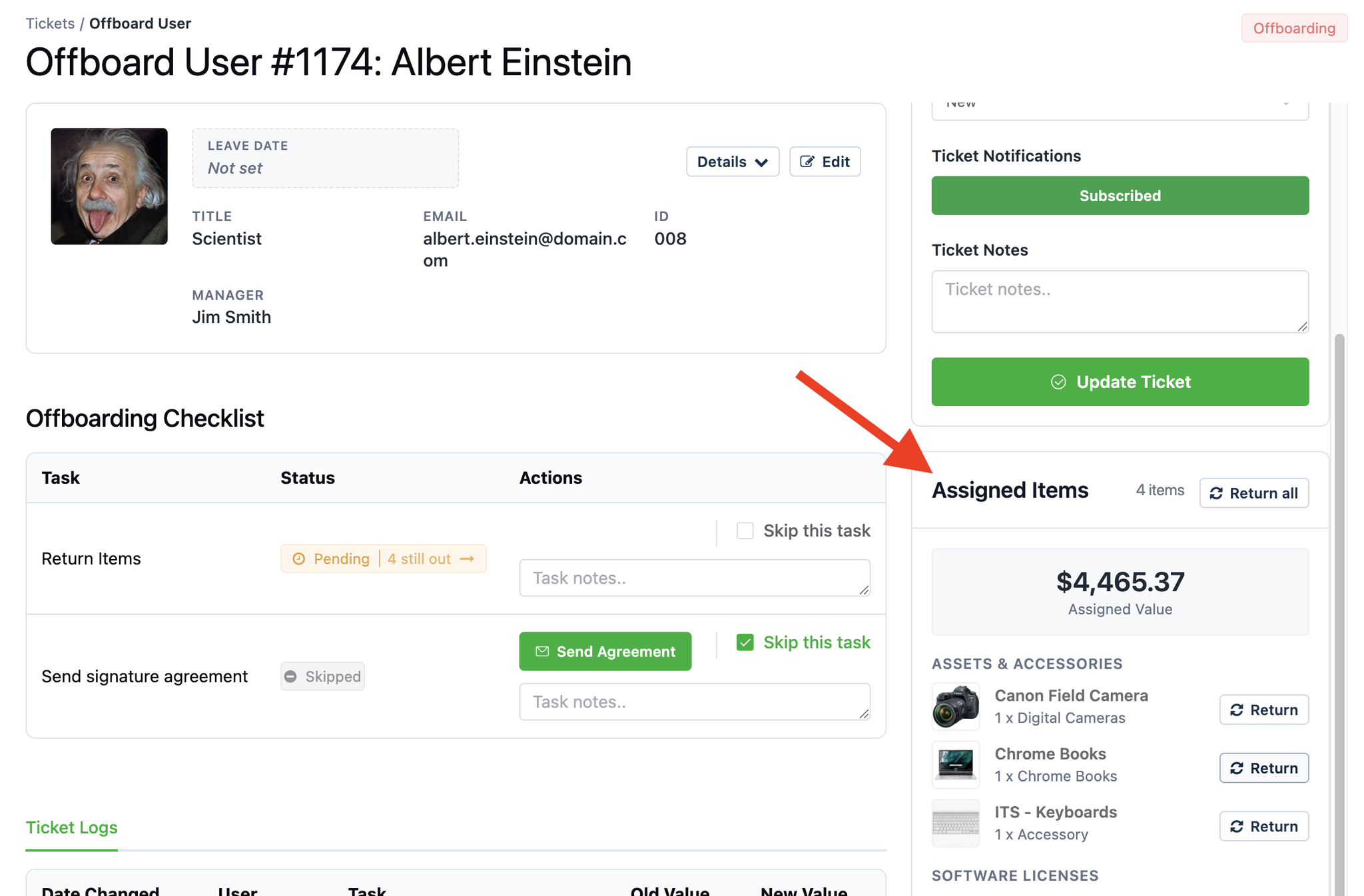
IT receives the laptop and phone, but the monitors haven’t been returned yet.
Rather than simply marking the employee as offboarded and moving on, the offboarding ticket lets your team see which equipment is still outstanding.
As items are returned, IT can check them back into inventory and update the ticket.
Reftab also supports customizable offboarding tasks, so your checklist can include things beyond equipment recovery, such as confirming that a building keycard was returned, recording access removal, or collecting a signed agreement.
Each task can be completed, skipped when appropriate, or documented with notes.
The goal is to have one place showing what needs to be done, what’s already complete, and what’s still waiting for someone to take action.
Keep a Record of the Offboarding Process
An often-overlooked part of employee offboarding is documenting what actually happened.
It’s one thing to have a checklist. It’s another to show that the checklist was followed.
For organizations working toward SOC 2, ISO 27001, or other security and compliance requirements, maintaining records of employee offboarding can help support internal reviews and audits.
For example, you may need to demonstrate that:
- Company equipment was identified when an employee left.
- Assigned assets were returned or accounted for.
- Required offboarding tasks were completed.
- Outstanding equipment was identified for follow-up.
- Actions taken during the offboarding process were documented.
Reftab maintains a ticket log as the team works through the offboarding checklist, providing a history of the actions recorded during the process.
This doesn’t automatically guarantee compliance, but it gives organizations a better way to document their procedures and demonstrate that offboarding tasks were performed.
For more information on how asset tracking supports security and compliance requirements, see our guide to asset lifecycle management compliance.
How to Enable Automatic Offboarding Tickets in Reftab
If you’re already using Reftab with Microsoft Entra ID or Okta, enabling automatic offboarding tickets is straightforward.
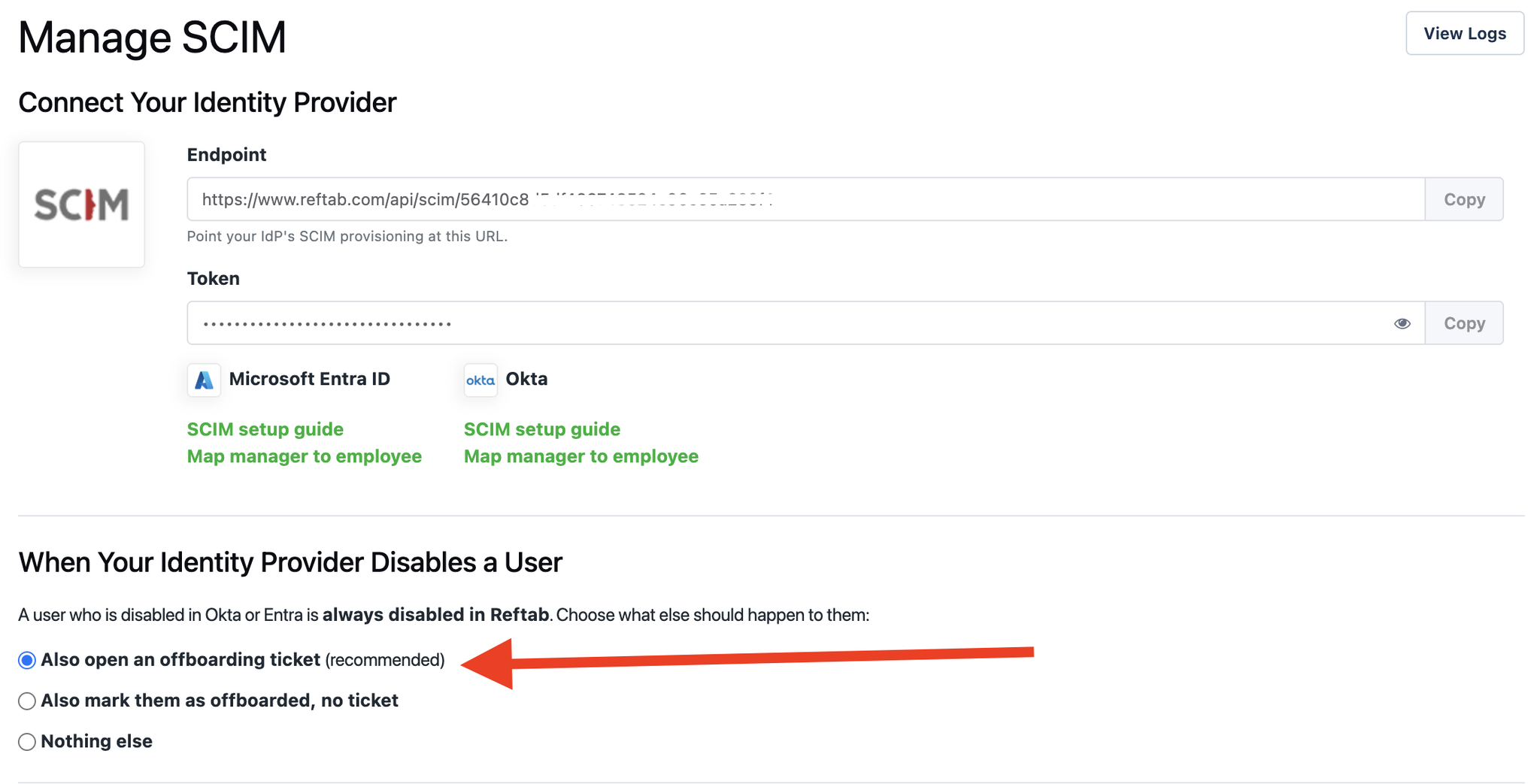
Navigate to your SCIM settings in Reftab and look for the section titled “When Your Identity Provider Disables a User.”
You’ll see three options:
- Also open an offboarding ticket (recommended) — Disables the user in Reftab and creates an offboarding ticket.
- Also mark them as offboarded, no ticket — Disables the user and marks them as offboarded without creating a ticket.
- Nothing else — Disables the user in Reftab without taking either additional action.
Selecting the first option allows Reftab to create the offboarding ticket automatically when a supported user-disable event is received through SCIM.
Your IT team can then manage the ticket from the Offboard User section in Reftab.
You can also create offboarding tickets manually or use a scheduled leave date when appropriate.
For full setup instructions, including how to customize tasks and manage equipment returns, see our onboarding and offboarding guide.
Make Employee Offboarding Part of Your IT Asset Management Process
Employee offboarding shouldn’t end when an account gets disabled.
IT still needs to recover equipment, complete the required tasks, and maintain a record of what happened.
By connecting employee status changes from Entra ID or Okta with asset assignments and offboarding tickets, Reftab helps automate the start of that process and gives IT teams a better way to track it through completion.
Whether you’re managing a small IT department or equipment across hundreds of employees and multiple locations, having a repeatable offboarding process can help reduce missing equipment and the manual work involved in tracking it down.
The goal is simple: know what employees have, know what needs to come back, and know when the work is complete.
See How Reftab Handles Employee Offboarding
Reftab brings employee records, IT assets, and offboarding workflows together so your team can track equipment throughout its lifecycle.

Michael Caslowitz
Table of contents
Your IT inventory, finally under control
Try Reftab for free, no strings attached. 50 assets free forever.
Continue reading
Sorry, we couldn't find any posts. Please try a different search.
Sorry, we couldn't find any posts. Please try a different search.
Ready to simplify IT asset management?
No credit card. No watered-down trial. Create a free account and see firsthand what Reftab can do.