
Asset Tags for Remote Employees: Best Practices for IT Teams
Table of contents
As more employees work remotely, one question comes up repeatedly:
Should you still use asset tags for remote employees?
The short answer is yes—but the asset tag is only one part of the process.
Why Asset Tags Still Matter
Even with Microsoft Intune, Jamf, Kandji, or other MDM platforms identifying devices by serial number, a physical asset tag provides benefits that software alone cannot:
- Quickly identify a device during shipping or returns
- Simplify inventory audits
- Match physical hardware to your asset management system
- Speed up help desk and warranty requests
What Should Be on an Asset Tag?
Many IT teams keep their labels simple.
A good asset tag typically includes:
- Company name
- Unique asset ID
- Barcode or QR code
- Optional support phone number or email
Avoid printing employee names or detailed company information. If a laptop is lost, unnecessary information can create security concerns without providing much value. This mirrors advice shared by many experienced system administrators who recommend keeping tags minimal and using your asset management platform as the source of truth.
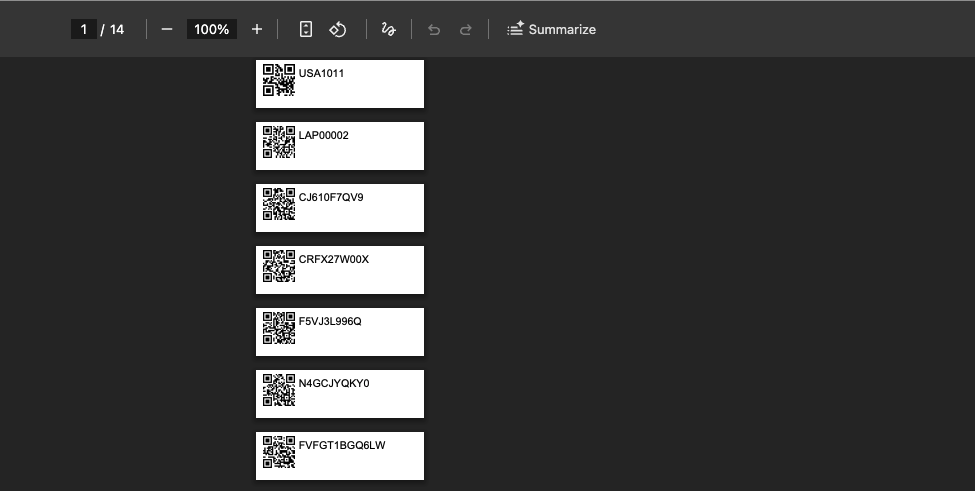
Within Reftab, you can design and print labels directly. Here is a simple example showing a QR-code and a serial number.
Asset Tags for Remote Employees
For remote workers, IT admins can tag the laptop when the device is being setup and prior to shipping to the employee. But in cases where employees purchase the laptop and it’s never sent to HQ, your only option is to mail an asset tag to the person for them to place it on the device. However, if the laptop has a visible serial number somewhere, there’s no real need to mail this remote employee an asset tag. The reason is that IT Teams wont be able to physically get near the device to audit it. When the employee ships the laptop back to HQ maybe at the end of their employment, then you can tag the laptop.
Your asset management platform should maintain:
- Current assigned employee
- Shipping history
- Check-in/check-out records
- Last known device status
- Warranty information
- Purchase details
The physical label simply links the laptop to its digital record.
Do You Need Barcodes?
It depends.
Some organizations scan asset tags every day. Others rarely use barcodes because modern laptops already include manufacturer serial numbers that can be scanned directly. Many IT teams find that a simple numbered asset label is sufficient, especially when devices are managed through MDM.
Best Practices for Asset Tags for Remote Employees
If your workforce is distributed, consider these recommendations:
- Assign every company-owned device a unique asset ID.
- Apply the asset tag before shipping the device.
- Track assignments in an IT asset management platform rather than a spreadsheet.
- Record accessories like docks, monitors, chargers, and headsets alongside the laptop.
- Integrate with your MDM to automatically update hardware details and user assignments.
- Maintain an offboarding workflow to simplify device recovery.
Final Thoughts
Asset tags for remote employees are still valuable, but they shouldn’t be your primary tracking method.
Modern IT teams rely on asset management software combined with MDM integrations to know who has a device, where it is, and its lifecycle status. The asset tag simply provides a fast way to connect the physical laptop with that digital record.
For organizations managing hybrid or fully remote workforces, this combination delivers the best balance of visibility, accountability, and operational efficiency.
Reftab helps IT teams manage remote employee devices by combining physical asset tracking with Microsoft Intune, Jamf, Kandji, Entra ID, and other integrations. As devices are assigned, shipped, or returned, asset records stay up to date without relying on spreadsheets.

Michael Plocher
Table of contents
Your IT inventory, finally under control
Try Reftab for free, no strings attached. 50 assets free forever.
Continue reading

Ready to simplify IT asset management?
No credit card. No watered-down trial. Create a free account and see firsthand what Reftab can do.