
IT Asset Tracking Spreadsheet vs. Software: 7 Signs It’s Time to Make the Switch
Table of contents
Every IT department starts the same way. Someone creates a spreadsheet — maybe it’s an Excel file on SharePoint, maybe it’s a Google Sheet — and starts logging laptops. They’ll put serial numbers in column A, assigned users in column B, purchase dates in column C. It works. For a while.
Then the company hires 30 people in a quarter. Or someone accidentally deletes a tab. Or your CFO asks for a depreciation report and you realize you’ve haven’t been tracking purchase costs. Or — the classic — a laptop goes missing and your spreadsheet says it was assigned to an employee who left six months ago.
If you’ve landed on this page, chances are you’re somewhere in that progression. You Googled “IT asset tracking spreadsheet” hoping to find a better template, but deep down you’re wondering whether a better spreadsheet is really the answer, or whether you’ve outgrown spreadsheets entirely.
This guide is going to help you figure that out. We’ll cover the specific breaking points that tell you a spreadsheet isn’t enough anymore, show you exactly what dedicated IT asset management software does differently (with a side-by-side comparison), and give you a concrete migration plan so the switch doesn’t feel overwhelming.

Why IT Teams Start with Spreadsheets (and Why That’s Fine)
Before we get into what breaks, let’s acknowledge what works. Spreadsheets are genuinely good at a few things:
- They’re free or cheap. If you already have Microsoft 365 or Google Workspace, you have a spreadsheet tool.
- They’re familiar. Everyone on your team already knows how to use them. There’s no training, no onboarding, no learning curve.
- They’re flexible. You can structure columns however you want, add conditional formatting, build formulas, and organize things your way.
- They work for small inventories. If you have 20 laptops and one person managing them, a spreadsheet is perfectly adequate.
The problem isn’t that spreadsheets are bad. The problem is that they don’t scale and most IT teams don’t realize they’ve hit the wall until they’re already deep into the pain.
7 Signs You’ve Outgrown Your IT Asset Tracking Spreadsheet
Here are the most common tipping points. If you recognize three or more of these, it’s probably time to move on.
1. Multiple People Are Editing the Same File (and Things Keep Breaking)
When it was just you maintaining the asset list, things were fine. But the moment two or three people start adding rows, updating statuses, or logging check-outs, version conflicts become a daily headache.
Even with Google Sheets’ real-time collaboration, it’s shockingly easy for someone to accidentally overwrite a formula, delete a row, or sort a single column instead of the entire sheet — breaking every row association in the process. With Excel files shared via email or SharePoint, it’s even worse: you end up with “Asset_List_FINAL_v3_Johns_edits.xlsx” floating around, and nobody knows which version is current.
Dedicated asset management platforms handle multi-user access natively. Every change is logged, attributed, and reversible. There’s no “someone broke the spreadsheet” moment because the data structure is enforced by the system, not by hoping everyone follows the same conventions.
2. There’s No Audit Trail
This is the one that bites IT teams during compliance reviews. Spreadsheets don’t track who changed what, or when. If a laptop goes missing and the spreadsheet says it was assigned to “John — Marketing,” there’s no record of who made that entry, when the assignment happened, or whether John ever actually received it.
In an ITAM platform, every action such as: assignment, status change, location update, maintenance event — is logged with a timestamp, the user who made the change, and the previous value. When your auditor asks “who had this device on March 15th and who approved the transfer?” you can answer in seconds.
3. Check-In and Check-Out Is Manual and Error-Prone
If your team loans out equipment, whether it’s laptops for new hires, projectors for conference rooms, or cameras for a production team, managing those transactions in a spreadsheet is painful. There’s no automated custody tracking, no timestamps, and no way for an employee to self-serve a request. Every single interaction requires someone on your team to manually type an entry.
This gets especially messy with seasonal equipment needs, temporary workers, or distributed teams where devices ship to home offices. For a deeper look at how this plays out, Reftab’s guide on tracking rental and loaner equipment covers the process and common pitfalls in detail.
4. You Can’t Scan Barcodes or Asset Tags
Spreadsheets have no native barcode or QR code support. That means every time you receive new hardware, perform an inventory audit, or check a device in or out, someone is manually typing serial numbers and asset IDs. A single transposed digit — “SN78432” instead of “SN78342” — and your records are silently wrong until someone catches it weeks or months later.
Purpose-built ITAM tools include mobile apps with barcode scanners. You scan the tag, the system pulls up the asset record, and you update it on the spot. What took 5 minutes of manual entry takes 5 seconds. If you’re curious about how barcode-based workflows actually function in practice, this post on using asset tags with Avery sheets is a helpful walkthrough.
5. Reporting Takes Hours Instead of Seconds
Need to know how many MacBooks are assigned vs. in storage? Which devices are approaching end-of-life? What you spent on hardware last quarter? How many assets are currently unassigned?
In a spreadsheet, answering these questions means building pivot tables, writing VLOOKUP or INDEX/MATCH formulas, and manually cross-referencing data across tabs. And every time someone asks a slightly different question, you’re rebuilding the report from scratch.
In a purpose-built tool, these are one-click reports. Dashboards update in real time. You can filter by device type, location, department, status, purchase date, warranty expiration — without touching a formula.
Reftab supports calculated expression fields, so formulas remain part of the asset record instead of being maintained in a separate spreadsheet.
6. You Have No Visibility into the Full Asset Lifecycle
A spreadsheet captures a snapshot in time. It tells you what you have right now (hopefully), but it doesn’t naturally track the full journey of a device: procurement, deployment, maintenance, reassignment, and eventual retirement or disposal.
Understanding this lifecycle isn’t just nice to have — it’s critical for budget planning, depreciation tracking, and compliance. When do you need to start budgeting for laptop refreshes? Which devices have been repaired three times and should be retired? What’s your average cost per device over its full lifespan?
Spreadsheets can’t answer these questions without heroic formula work. Reftab’s blog post on mastering the 6 stages of the IT asset lifecycle breaks down each phase and explains why tracking it matters for your bottom line.
7. Your Software Licenses Are Tracked Somewhere Else (or Nowhere)
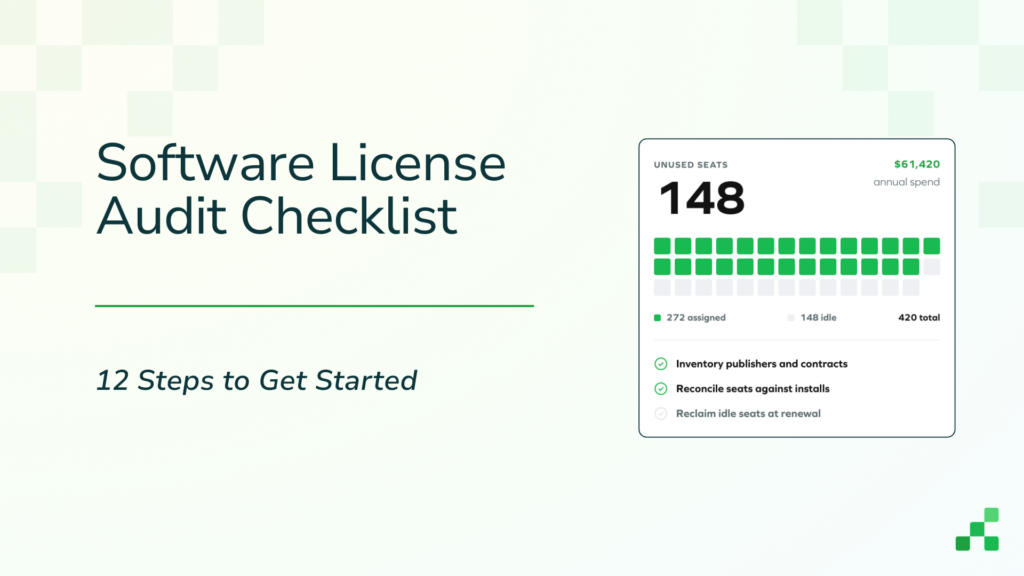
Hardware is only half the picture. Most IT teams also need to track software licenses, SaaS subscriptions, and renewal dates. If those live in a separate spreadsheet (or worse, in someone’s email inbox or a sticky note on a monitor), you’re creating blind spots that lead to overspending and compliance risk.
The average mid-size company wastes 25–30% of its SaaS spend on unused or underutilized licenses. A spreadsheet can’t tell you that, but a platform that tracks software alongside hardware can. For organizations juggling a growing SaaS stack, this guide on software asset management and cost control explains how to get ahead of it.
Spreadsheet vs. Dedicated ITAM Software: A Direct Comparison
If you’ve only ever used spreadsheets for asset tracking, it can be hard to picture what a dedicated platform offers beyond “a fancier table.” The difference isn’t cosmetic, it’s structural. Here’s how they compare across the capabilities that matter most to IT teams:
| Capability | Spreadsheet (Excel / Google Sheets) | Dedicated ITAM Software |
|---|---|---|
| Asset assignment & custody | Manual entry, no history | Automated with full audit log |
| Check-in / check-out | Manual, error-prone | Barcode scan or self-service portal |
| Barcode / QR scanning | Not supported | Built-in mobile app |
| Multi-user collaboration | Version conflicts, accidental overwrites | Role-based access, enforced data structure |
| Reporting | Manual pivot tables & formulas | One-click reports & real-time dashboards |
| Software license tracking | Separate sheet (or none) | Unified with hardware in one platform |
| Integrations (MDM, SSO, HR) | None | Intune, Jamf, SCIM, LDAP, Microsoft, and more |
| Depreciation tracking | DIY formulas (error-prone) | Built-in depreciation module |
| Maintenance scheduling | Calendar reminders (manual) | Automated workflows & work orders |
| Onboarding / offboarding | Manual checklist | Automated equipment assignment & collection |
| Data validation | None (anyone can enter anything) | Enforced fields, dropdowns, required data |
| Mobile access | Limited (clunky on phones) | Native iOS and Android apps |
For a more comprehensive look at evaluating these tools, Reftab’s ultimate guide to IT asset management tools covers the key features you should prioritize.
When Is the Right Time to Switch?
There’s no magic number of assets that triggers the move. But after working with thousands of IT teams, the tipping point usually involves a combination of these factors:
- You’re managing more than 50–100 assets. At this scale, spreadsheets start to slow down and mistakes become harder to catch. Scrolling through hundreds of rows to find one device is not a sustainable workflow.
- More than one person needs to update asset data. The moment you have two or more people editing, you’ve introduced risk that a spreadsheet can’t mitigate.
- You’re being asked for reports or audits. If leadership, finance, or compliance teams need accurate, on-demand asset data, a spreadsheet won’t cut it. You’ll spend hours building reports that a proper tool generates in seconds.
- Onboarding and offboarding is getting more complex. As headcount grows, manually tracking who has what equipment — and making sure devices are collected when people leave — becomes a full-time job.
- You’re losing track of devices. If assets are going missing, you’re discovering “ghost” devices that should have been retired, or you’re not sure who has custody of a machine, that’s the clearest signal of all.
If you’re not sure which category of solution is right for your team, this comparison of the 5 different approaches to asset management — from pen-and-paper to enterprise platforms, can help you figure out where you fall.
What to Look for in an IT Asset Management Platform
Not all ITAM tools are created equal. Some are enterprise-grade systems that require a dedicated implementation team and a six-figure budget. Others are lightweight, intuitive platforms built for small-to-midsize IT departments that just need something that works without a three-month rollout.
Here are the features that matter most for teams migrating from spreadsheets:
- Easy import from CSV/Excel. You shouldn’t have to start from scratch. Look for a platform that lets you import your existing spreadsheet data in minutes, not weeks. Your historical data has value — don’t abandon it.
- Barcode and QR code scanning. A mobile app that scans asset tags turns a 5-minute manual lookup into a 5-second scan. This single feature pays for itself in time savings during audits alone.
- Check-in / check-out with custody history. Every assignment should be logged automatically with timestamps and user info. No more “I think Sarah has that laptop.”
- Integrations with your existing tools. If you’re already using Jamf, Microsoft Intune, Apple Business Manager and vendors like CDW, Dell, Lenovo etc. your asset management tool should pull data from those systems automatically instead of requiring double entry.
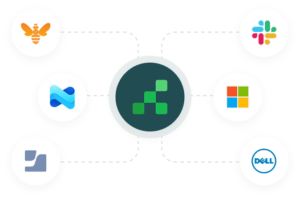
- Software and hardware in one place. Tracking physical devices in one tool and licenses in another defeats the entire purpose of leaving spreadsheets behind. Look for a platform that unifies both.
- A free tier or trial to test with real data. You should be able to evaluate the platform with your actual assets — not a sandbox with fake data — before committing budget.
How Reftab Helps IT Teams Move Beyond Spreadsheets
Reftab was built specifically for this transition. Since 2013, thousands of IT teams — from 10-person startups to large universities and enterprises — have used it to replace spreadsheets with a cloud-based platform that handles hardware tracking, software license management, maintenance scheduling, and employee onboarding/offboarding in one place.
Here’s what makes it a particularly good fit for teams coming from spreadsheets:
- Import your existing data instantly. Upload your CSV or Excel file and Reftab maps your columns automatically. You’re up and running in minutes with your real data, not starting from a blank screen.
- Scan asset tags from your phone. Reftab’s iOS and Android apps include a built-in barcode scanner, so you can check devices in and out, run physical audits, and update asset info on the go — no laptop required.
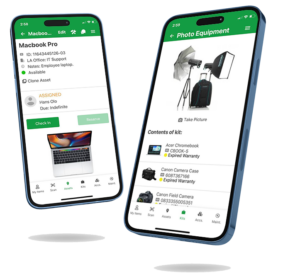
- Full audit trail on every asset. Every assignment, status change, and maintenance event is logged with a timestamp and user record. When your auditor asks a question, you have the answer.
- Integrations that pull data automatically. Reftab connects with Jamf, Intune, Meraki, Mosyle, Lansweeper, NinjaOne, SCIM, LDAP, and SSO — so your asset inventory stays current without anyone manually entering data.
- Track hardware and software together. Monitor SaaS usage, manage license renewals, and get AI-powered software categorization alongside your physical asset tracking. No more maintaining separate systems.
- Automate onboarding and offboarding. Use workflow automations to assign equipment to new hires on day one and collect it when people leave. HR integration keeps everything in sync automatically.
- SOC 2 compliant. Your asset data is sensitive. Reftab takes security seriously with SOC 2 certification, role-based access controls, and enterprise-grade infrastructure.
- Free for up to 50 assets. Start with a free Reftab account and test it with your actual data. No credit card required. Paid plans start at $30/month for 500 assets.
Ready to move your asset spreadsheet into Reftab?
Learn how to import one or multiple asset categories from an Excel or CSV file.
Making the Switch: A Step-by-Step Migration Plan
If you’ve decided it’s time to move off spreadsheets, here’s a straightforward approach that minimizes disruption. Your spreadsheet does not need to contain only one type of asset. If laptops, monitors, phones, networking equipment, tools, or other assets are stored in the same file, Reftab’s multi-category importer can group them and guide you through creating the appropriate categories, fields, and locations.
Step 1: Clean up your existing spreadsheet.
- Remove obvious duplicate rows. (Reftab’s ITAM platform will help prevent duplicate serial numbers)
- Add a category or asset-type column.
- Check that assigned-user email addresses are valid.
- Identify blank or inconsistent location values.
- Confirm that dates and monetary values are stored consistently.
Step 2: Decide what you need to track. At minimum: device type, serial number, assigned user, status (deployed, in storage, retired), and purchase date. For guidance on what fields to include beyond the basics, this post on what assets you should be tracking is a solid starting point.
Step 3: Import your data. Upload your spreadsheet to your new platform and verify that every column mapped correctly. Most platforms let you preview the import before committing.
Step 4: Print and apply asset tags. If you haven’t already tagged your hardware with barcodes or QR codes, now is the time. Physical tags make every future interaction — audits, check-outs, troubleshooting — dramatically faster.
Step 5: Connect your integrations. Link your MDM (Jamf, Intune, etc.), directory service (Active Directory, Okta), and HR platform to keep data flowing automatically. This is what eliminates the manual data entry that made spreadsheets so painful in the first place.
Step 6: Run a physical audit. Walk through your office, server room, or warehouse with the mobile app and scan every tagged device. This validates your imported data against reality and gives you a clean, trustworthy baseline to build on.
The Bottom Line
Spreadsheets are a perfectly reasonable starting point for IT asset tracking. But they’re a starting point, not a destination. As your team grows, your device count increases, and your compliance requirements tighten, the time you spend maintaining that spreadsheet starts to outweigh the cost of a dedicated tool.
The good news is that the switch doesn’t have to be painful or expensive. Modern ITAM platforms are designed to meet you exactly where you are — with CSV imports that preserve your existing data, intuitive interfaces that don’t require training, and free tiers that let you test with real assets before committing budget.
If you’re ready to see what life looks like on the other side of the spreadsheet, try Reftab free for up to 50 assets or book a demo to see how it works with your team’s specific setup.
Already have an asset spreadsheet? View the complete guide to importing your data into Reftab.
Frequently Asked Questions
Can I use Excel to track IT assets?
Yes — and for small teams with fewer than 50 devices and a single person managing the list, Excel or Google Sheets can work fine. The problems start when multiple people need to edit the same file, when you need an audit trail for compliance, or when your asset count grows into the hundreds. At that point, the time spent maintaining formulas, fixing broken references, and manually entering data starts to outweigh the cost of a dedicated tool.
What should I track in an IT asset management system?
At minimum, you should track device type, make/model, serial number, asset tag number, assigned user, status (deployed, in storage, retired), purchase date, and purchase cost. Beyond that, many IT teams also track warranty expiration dates, vendor information, maintenance history, and depreciation. For a detailed breakdown, see our guide on what assets you should be tracking.
How much does IT asset management software cost?
Pricing varies widely. Enterprise platforms can run thousands per month, while tools designed for small-to-midsize teams are much more affordable. Reftab, for example, is free for up to 50 assets with unlimited users. View current Reftab plans and pricing. Most platforms offer free trials so you can test with your actual data before committing.
How do I migrate from a spreadsheet to asset management software?
The process is simpler than most people expect. Clean up your existing spreadsheet (remove duplicates, standardize column names), then import the CSV or Excel file directly into your new platform. Most tools auto-map your columns and let you preview before committing. From there, connect your integrations (MDM, directory service, HR tools) and run a physical audit to validate the data. The time required depends on the size and condition of the spreadsheet, but Reftab can import multiple asset types from one file without requiring you to split the file by category.
What’s the difference between asset tracking and asset management?
Asset tracking is knowing where your assets are and who has them — the basics of location and custody. Asset management is the broader discipline that includes tracking but also covers the full lifecycle: procurement, deployment, maintenance, software licensing, depreciation, compliance, and disposal. Most IT teams need both, which is why platforms like Reftab handle the entire lifecycle rather than just tracking. For more on this distinction, see our post on the IT asset lifecycle.
Is there a free IT asset tracking tool?
Several platforms offer free tiers. Reftab’s free plan includes up to 50 assets with unlimited users, unlimited inventory and software tracking, and access to the mobile app with barcode scanning. This is enough for small teams to fully evaluate the platform with real data before upgrading, and for very small organizations it may be all you ever need.

Michael Caslowitz
Table of contents
Your IT inventory, finally under control
Try Reftab for free, no strings attached. 50 assets free forever.
Continue reading
Ready to simplify IT asset management?
No credit card. No watered-down trial. Create a free account and see firsthand what Reftab can do.