
Apple Business Manager Meets IT Asset Management Software: A Guide for IT Admins
Table of contents
The best IT admins aren’t the ones putting out fires all day. They’re the ones who built systems that prevent fires in the first place.
They bring clarity to chaos. They create organization where there was none. And most importantly, they save their company time and money by automating the repetitive work that used to eat up their week.
If you’re managing Apple devices and looking for an IT asset management platform that integrates with Apple Business Manager, you’re already thinking like one of those admins. You know that manual data entry doesn’t scale, and you’re looking for a better way.
This post will break down exactly what Apple Business Manager does (and doesn’t do), why connecting it to an ITAM platform matters, and how Reftab’s direct ABM integration can help you build the kind of automated, organized IT operation that makes your entire department look good.
First, Let’s Clear Up a Common Misconception: Apple Business Manager Is Not an MDM
This trips up a lot of people, so let’s get it out of the way: Apple Business Manager is not a Mobile Device Management solution. It doesn’t push configurations. It doesn’t install apps. It doesn’t send remote commands to your devices.
So what is it?
Apple Business Manager is essentially a database. It stores information about the Apple devices your organization has purchased—serial numbers, warranty status, purchase dates, and device eligibility for enrollment. That’s it.
All the actual management—deploying profiles, enforcing policies, wiping devices, installing software—comes from whatever MDM you’re using (Jamf, Kandji, Mosyle, Intune, etc.). ABM’s job is to know which devices belong to your organization and to tell your MDM “hey, this device should be enrolled with you.”
This distinction matters because it reveals a gap in most Apple device workflows: your MDM handles management, but what about tracking?
Where IT Asset Management Software Comes In
Your MDM knows how to manage devices. But it wasn’t built to answer questions like:
- When does the warranty expire on our 2022 MacBook fleet?
- Which devices are due for hardware refresh this quarter?
- Who has custody of device X, and what’s its full history?
- What did we pay for these devices, and when did we buy them?
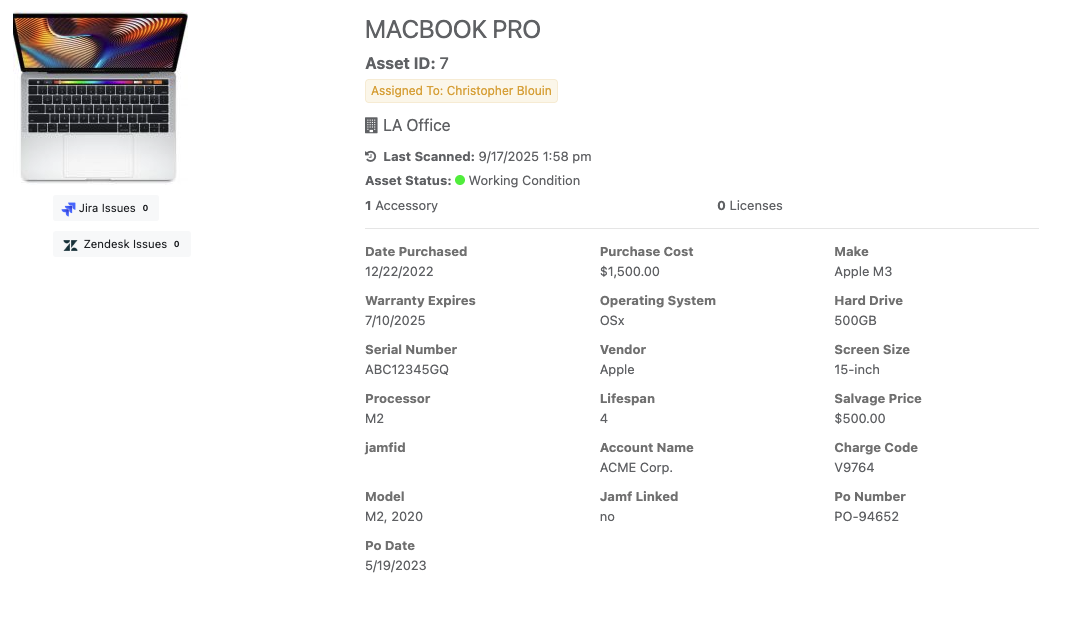
That’s where IT asset management comes in. An ITAM platform is your single source of truth for device lifecycle, ownership, procurement history, and inventory status. It’s the layer that sits above your MDM and gives you visibility into your entire fleet—not just what’s happening on the devices, but who owns them, what they cost, and when they need attention.
The problem? Most ITAM platforms require you to manually enter device data. Export from ABM, clean up the spreadsheet, import into your asset tracker, and repeat every time you procure new hardware.
That’s not automation. That’s busywork dressed up as process.
What Changes When Your ITAM Platform Integrates Directly With ABM
When your IT asset management platform connects directly to Apple Business Manager, manual data entry disappears.
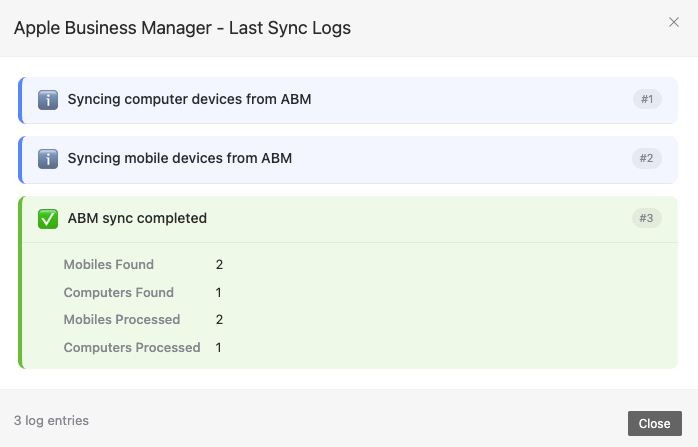
Reftab’s ABM integration automatically syncs:
- Serial numbers – Every device in your ABM account appears in Reftab without manual entry
- Warranty information – See exactly when AppleCare coverage expires so you can plan refreshes proactively
- Purchase dates – Track device age and procurement timelines automatically
New devices added to Apple Business Manager flow into Reftab automatically. No exports. No imports. No reconciliation headaches.
This isn’t just about convenience—it’s about building an IT operation that runs on accurate, up-to-date data without requiring constant manual upkeep.
Why This Matters for Your Career (and Your Department’s Reputation)
Here’s something that doesn’t get talked about enough: the IT admins who get promoted, who get budget increases, who get recognized by leadership—they’re not the ones who are “really busy” all the time.
They’re the ones who can show results.
When you automate your Apple device tracking, you’re not just saving yourself time. You’re building the foundation for the kind of IT department that leadership actually notices:
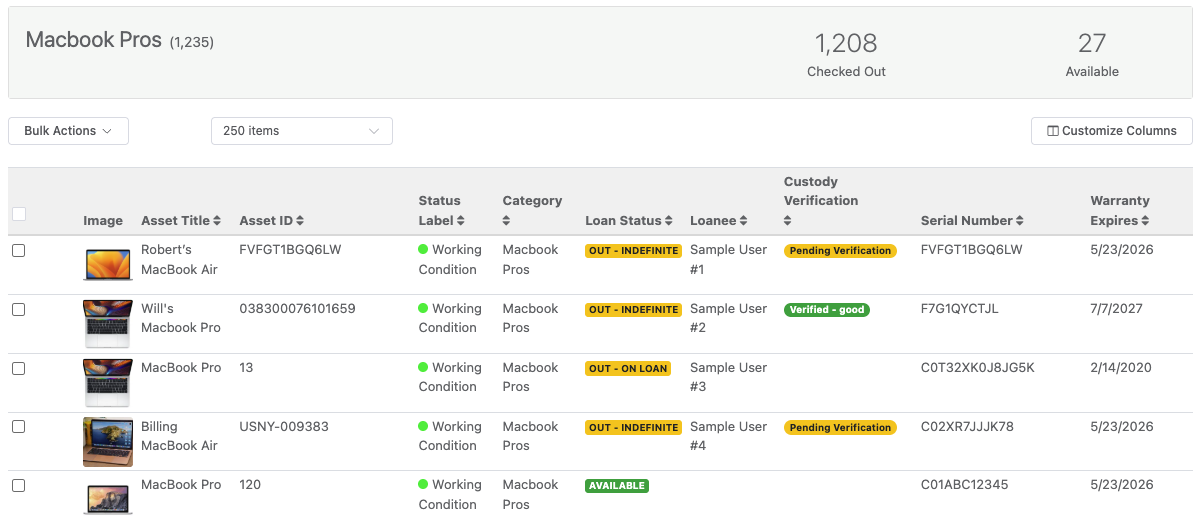
Clarity – You can answer questions about your device fleet in seconds, not hours. When the CTO asks how many devices are out of warranty, you have the answer immediately.
Organization – Every device has a record. Every assignment is tracked. Every warranty expiration is visible. Nothing falls through the cracks.
Time savings – The hours you used to spend on manual data entry? They’re now available for projects that actually move the business forward.
These are the metrics that matter when budget season comes around. These are the results that make leadership see IT as a strategic function, not just a cost center.
Build an IT Operation Worth Showcasing
The best IT departments aren’t just functional, they’re examples of how things should be done. They have systems that work. Processes that scale. Data that’s accurate and accessible.
Connecting Reftab to Apple Business Manager is one piece of that puzzle. But it’s a meaningful piece, because it eliminates one of the most tedious, error-prone tasks in Apple device management and replaces it with automation that just works.
Combine that with Reftab’s other integrations: MDMs like Jamf and Kandji, identity providers like Entra and Okta, procurement platforms like CDW and you’re not just tracking assets. You’re building an automated ITAM platform that keeps itself current.

That’s the kind of system that makes you look good. More importantly, it’s the kind of system that makes your entire IT department look good.
Get Started Today
Ready to connect Apple Business Manager to an IT asset management platform that actually automates your workflow?
Create your free Reftab account →
Already have an account? Follow our step-by-step guide to set up the integration:
📖 See our Apple Business Manager Integration Guide Here
Reftab is an IT asset management platform built for IT teams who want to automate device tracking, bring clarity to their hardware inventory, and spend less time on manual data entry. Track hardware, software licenses, and accessories in one place—with integrations that keep your data current automatically.

Michael Caslowitz
Table of contents
Your IT inventory, finally under control
Try Reftab for free, no strings attached. 50 assets free forever.
Continue reading

Ready to simplify IT asset management?
No credit card. No watered-down trial. Create a free account and see firsthand what Reftab can do.