
How to Import Current Asset Assignments from Spreadsheets
When starting out with Reftab, you may be coming from spreadsheets. If you have a list of users and their current asset assignments, this guide will help you import that data into Reftab.
1) After all your assets are successfully imported. Click “Settings” > “Import Export Data” and find the section, “Import Asset Loans”
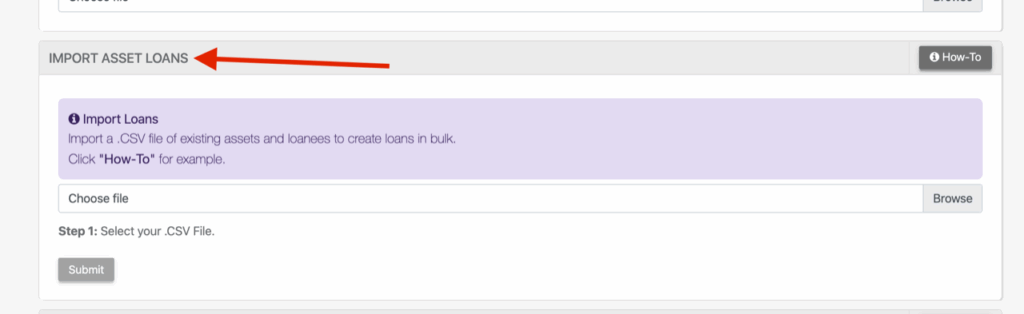
2) You’ll need a CSV file with two columns:
First column is a list of the asset IDs.
Second column is the unique email address of the loanees that each Asset ID is linked to.
For example:
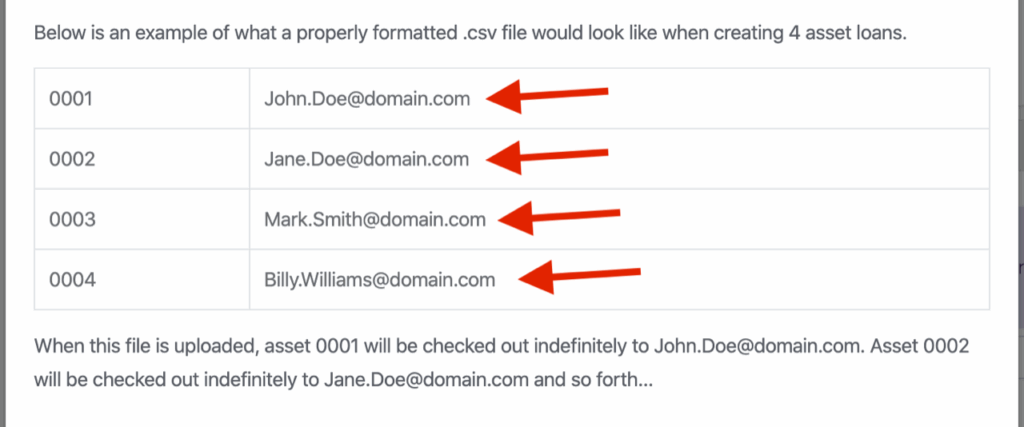
3) Each line in the CSV will create an indefinite loan. (note, in this CSV file it does not matter what location or category the asset belongs to. You just need the asset ID and loanee’s email address).
Need help? We're here for you
For any questions or assistance, feel free to reach out to us.
Your assets, simplified. Begin your journey with us!
50 assets free forever with unlimited inventory & software tracking. Includes email alerts, mobile apps, reports, custom asset tags and more.