
How to send additional overdue loan emails when items are overdue
By default, Reftab will send one overdue email to users in possession of items overdue for return. You can automatically configure additional overdue email notices to send. This feature is only available to accounts on Pro plan and up.
Log into Reftab as an administrator and click “Settings” > “Automated Workflows” > “New Workflow“
Choose the trigger of “Schedule” then set when you want the emails to send.
Click “Add Condition” and set: “Loan due date less than now“
Click “Add Action” and set: “Send Email Overdue Asset To Assets Loanee“
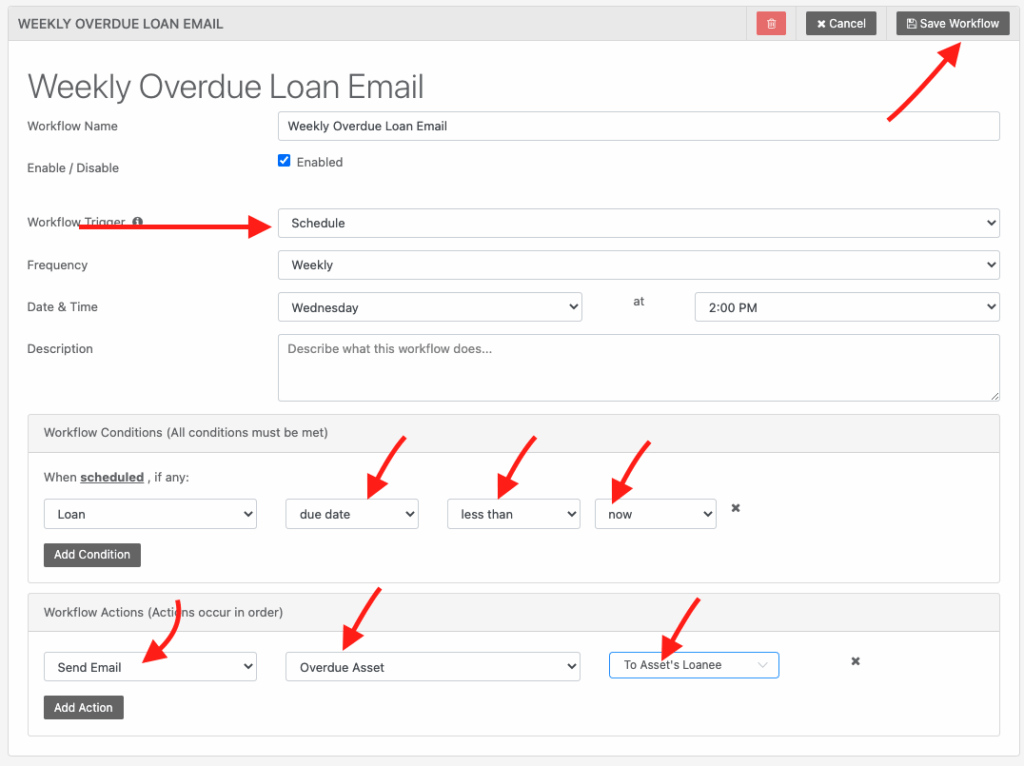
Click “Save Workflow” when done.
Need help? We're here for you
For any questions or assistance, feel free to reach out to us.
Ready to simplify IT asset management?
No credit card. No watered-down trial. Create a free account and see firsthand what Reftab can do.