
Title must be present when importing assets
When importing asset data, if you see the notice, “attribute title must be present“, this means that you’re importing assets without a column for “title”. You need to add a column into your CSV file that will be used for each asset title. The asset title is important. It is the visible name that is used throughout the platform to help identify an asset. For example, model information is commonly used as a title when tracking IT gear: “Macbook Pro”, “Lenovo Thinkpad”, etc..
Note that Reftab has a multi-category importer that allows you to create assets with a guided walk through wizard. This new guided importer allows you to choose which column becomes the asset name so you can avoid any extra work. For example if you have a column for “Model” you can use that column as both the “Title” of all your assets and as the actual model value stored on the asset field data. See our guide on our multi-category importer here.
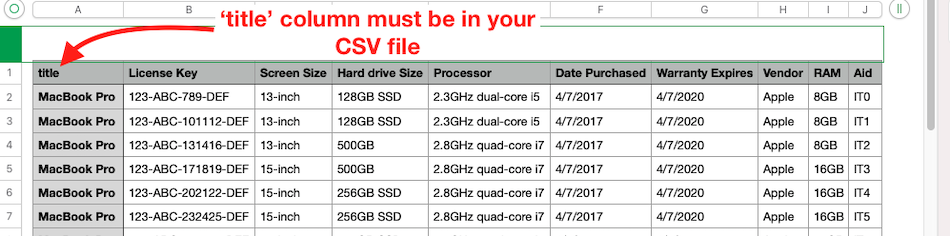
When you import your data, Reftab has a default field for “Asset Name” and this is what title is used for. When importing assets, you will need to select ‘title’ for one of the columns:

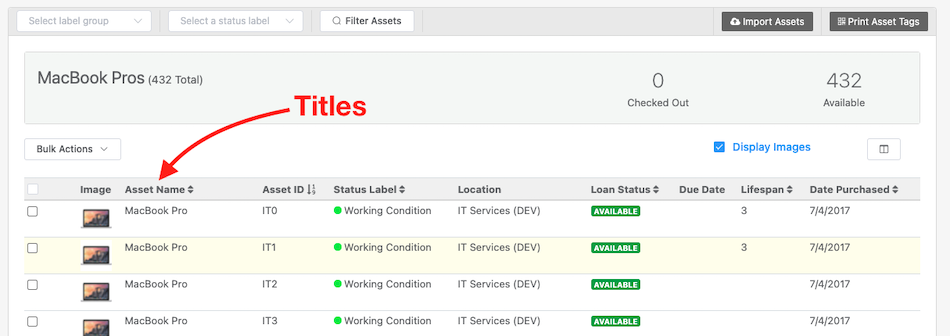
For example, see the screenshot below, each asset in the MacBook Pro category is titled with “MacBook Pro”. These are the titles that are assigned to each asset during import.
Need help? We're here for you
For any questions or assistance, feel free to reach out to us.
Ready to simplify IT asset management?
No credit card. No watered-down trial. Create a free account and see firsthand what Reftab can do.