
Construction Asset Management Software: The Complete Guide for Contractors
Table of contents

Construction companies manage millions of dollars in equipment, tools, and vehicles across job sites that are constantly in motion. Most of that inventory is still tracked with spreadsheets, paper logs, or software built for people sitting at desks, not workers in the field. When something goes missing or breaks down, the answer is usually a chain of phone calls, not a database lookup.
Construction asset management software exists to close that gap.
In this guide, we cover what to actually look for, where implementations go wrong, and how contractors are using these tools to get real control over their equipment.
What Construction Asset Management Software Does
Construction asset management software tracks equipment, tools, and vehicles across their full asset lifecycle from acquisition through disposal. For construction companies, this often means multi-location tracking and the ability to log assets in locations that may or may not have access to wifi.
Here are the core capabilities you should expect:
- Real-time equipment location tracking across job sites
- Check-in and check-out systems for tools and machinery
- Maintenance management including scheduling and service history
- Asset utilization reporting to identify underused equipment
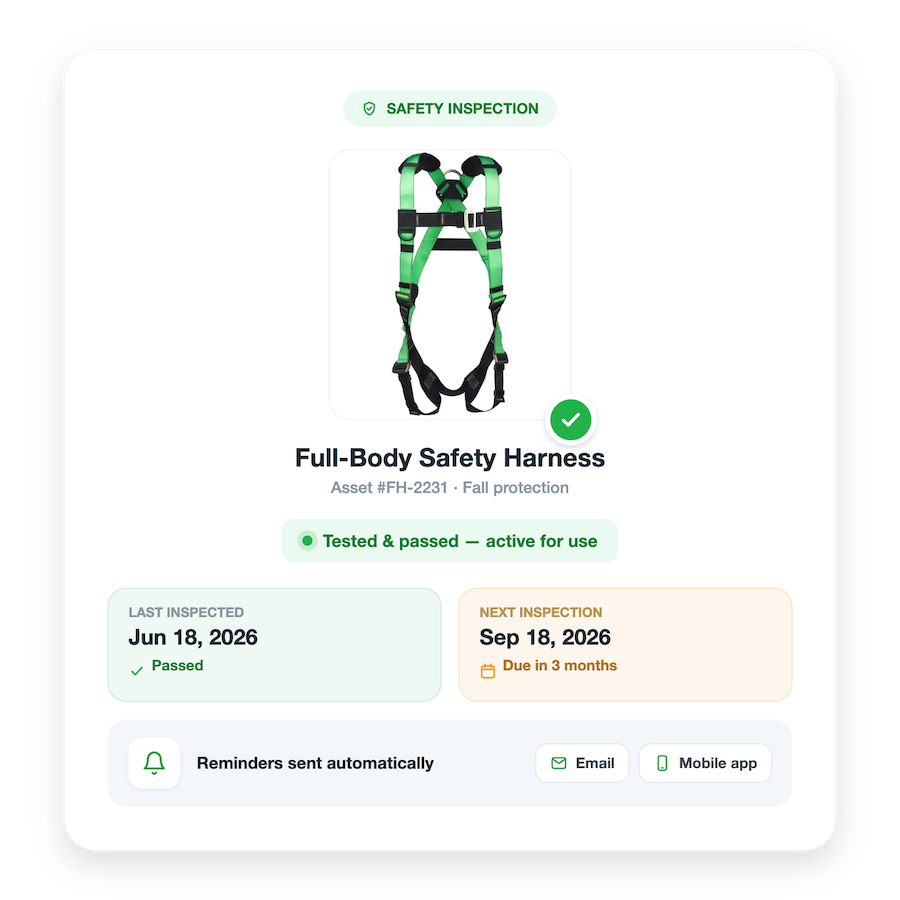
- Compliance documentation for inspections and certifications
- Cost tracking to inform ownership versus rental decisions
What Construction Companies Need in Asset Management Software
Field teams have different requirements than office workers. The software has to be built for job site conditions, not adapted from something else.
- An asset management app: Field workers use smartphones, not laptops. The interface needs to be designed for mobile as the primary access point, with large touch targets, simplified workflows, and screens readable in direct sunlight.
- Offline functionality: Job sites frequently lack reliable internet. The software needs to work fully offline and sync automatically when connectivity returns. Workers can’t wait for WiFi to check out equipment or log a maintenance issue.
- Durable asset tagging: Standard barcode labels fail fast in construction environments. Effective solutions use industrial-grade QR codes or RFID tags with weather-resistant materials that adhere to metal, plastic, and painted surfaces, with engraving options for high-value equipment.
- Simple field workflows: Check-in and check-out should take seconds, not minutes. If completing a basic task requires navigation through multiple screens, it won’t get done consistently.
Key Features for Construction Asset Management
With those essential field requirements in mind, here are the key features any successful construction asset management platform must offer.
Job Site-Based Tracking
Equipment moves between job sites constantly. Your software should make it easy to see what’s at each location, transfer assets between sites, and pull a full movement history when you need to trace where something went.
In fact, Reftab supports industrial-grade asset tags built for construction environments, including weather-resistant QR codes designed to hold up on active job sites.
This is also why using an asset management solution with a mobile app is so important. For example, Reftab’s mobile app works fully offline. Field teams can scan assets, update records, and complete workflows without internet connectivity. Data syncs automatically when the connection returns.
For a deeper look at this feature, check out this video.
Maintenance Management
Construction equipment requires regular maintenance to stay operational and compliant. Look for:
- Automated maintenance schedules based on hours or calendar intervals
- Service history and repair documentation
- Alerts for upcoming inspections and certifications
- Integration with maintenance vendors and service providers
Utilization Tracking
Many construction companies own equipment that sits idle while they’re paying rental fees for the same thing on another site. Utilization reporting surfaces those gaps and gives you real data to make better buy versus rent decisions.
For instance, at Weifield Group, John Marchesi, who manages tools and purchasing for Weifield Group across Colorado, Texas, and Tennessee, configured the entire system himself, no coding required, setting up categories, user permission levels, and automated monthly tool reports. Those reports go out on the second of each month and give job site managers ten business days to reconcile what’s on the list against what’s actually on site. What used to be a reactive process of tracking down equipment became a scheduled, documented workflow.
Check-In/Check-Out Systems
Accountability reduces loss and theft. Field workers check equipment in and out with a single scan. Managers get visibility into who has what and where it is without adding a complex process on top of an already full workday.
Depreciation and Cost Tracking
Understanding the true cost of owning equipment means tracking more than the purchase price. A complete picture includes:
- Purchase price and depreciation schedules
- Maintenance and repair costs
- Fuel and operating expenses
- Insurance and storage costs
How to Evaluate Construction Asset Management Software
IT teams at construction firms should evaluate solutions based on field usability, not just feature checklists.
Here are a few things to verify before you commit:
- Test in real field conditions. Conference room demos don’t reveal how software performs on an actual job site. Request a trial period and have field workers test it with real equipment in real conditions.
- Prioritize the app experience. Evaluate the mobile app as the primary interface, not a secondary feature. That’s where most interactions will happen. If field workers can’t or won’t use the app, adoption will be slow or nonexistent.
- Verify offline capabilities. Many vendors claim offline functionality but only deliver limited features without connectivity. Test it without internet before you believe it.
- Assess tag durability. Request sample tags and expose them to actual field conditions: weather, dirt, repeated handling. If they don’t survive your test, they won’t survive your job sites.
- Consider implementation requirements. Lengthy implementations that require IT involvement and extensive training programs tend to fail. The right solution should be adoptable quickly, with minimal overhead.
This is exactly why Qanstruct’s IT coordinator Carly Vanderkolk chose Reftab over several other options, including Australian-based competitors she’d evaluated. Usability won. She tested multiple platforms, and Reftab was the one that actually matched how her team worked. Once it was in place, all three members of her IT team started updating the system directly in real time, instead of routing every request through her inbox. The shift happened because the system was usable, not because it was comprehensive from day one.
Common Implementation Challenges
Choosing the right platform is only the first step. Successful deployment often depends on navigating a few common implementation challenges.
Resistance from Field Teams
Workers used to informal tracking methods will push back on new systems. Getting adoption requires:
- Involving field workers in the selection process
- Making the benefits concrete: less time hunting for equipment, fewer double-orders
- Keeping workflows fast and simple
- Supporting people through the transition rather than just mandating change
Incomplete Asset Data
Most construction companies don’t have a clean, complete record of everything they own. Initial implementation means auditing and tagging all assets, which takes time. That work is the foundation on which everything else is built, so it’s worth doing right.
Integration with Existing Systems
Construction operations often need asset management to connect with accounting software, project management tools, and service desk platforms. Evaluate integration capabilities early not after you’ve already bought something.
Nuvve Corporation, a green energy company managing vehicle-to-grid charging stations across the US, France, Belgium, Japan, South Africa, and the Philippines, handled this by connecting Reftab to their existing Jira Service Desk through a native plugin. When a charging station needed service, the ticket automatically linked to that asset’s full record: warranty status, technical specs, contact information, and service history. Information that previously lived across email threads and spreadsheets was suddenly in one place and visible to both internal teams and external service partners.
Measuring ROI from Asset Management Software
Addressing those initial challenges quickly leads to measurable results. Here is how contractors calculate the ROI from asset management software.
Reduced Equipment Loss
When every asset has a logged location and a clear owner, equipment is harder to lose and easier to recover. This means everyone is held accountable. Workers know the record exists, managers can pull location history, and the informal “I think it’s at XX site” answer stops being acceptable. For multi-site operations where tools routinely move between crews, that paper trail is the difference between finding something and reordering it.
Lower Rental Costs
Utilization data reveals a problem most construction companies know exists but can’t quantify. That’s owned equipment sitting idle on one site while the same category gets rented at another. Once you can see actual utilization by asset and by location, you can redeploy before you rent. That gap closes fast when the data is visible.
Decreased Downtime
Unexpected equipment failures stop job sites. Proactive maintenance scheduling with automated alerts tied to hours or calendar intervals catches issues before they become failures. The cost of a missed maintenance window shows up in project timelines, not just repair bills.
Improved Utilization
With actual usage data, fleet decisions stop being gut calls. You can identify equipment that’s consistently underused and sell or redeploy it, and make better calls on what to buy versus what to keep renting. For instance, Qanstruct uses Reftab’s reporting to do exactly this on the IT hardware side. The laptop age report tells leadership which machines need replacement and when, which feeds directly into cash flow planning rather than last-minute budget requests.
Ultimately, the decision to invest in new software comes down to its impact on your operations.
The Bottom Line for Construction Companies
Construction asset management software delivers value only when it actually works in the field. The best platform is the one your field teams use consistently because it’s fast, simple, and doesn’t get in the way of the job.
Prioritize mobile-first design, offline functionality, and workflows simple enough that a worker with gloves on can complete them in under a minute. Everything else follows from that.
Reftab offers a free plan for up to 50 assets, which is enough to run a real pilot before you commit to anything. Start for free and see how it works with your actual equipment and your actual team.
Frequently Asked Questions
What is construction asset management software?
It’s a system for tracking physical assets, including tools, equipment, IT hardware, and vehicles, across job sites, warehouses, and offices. It replaces manual spreadsheets with a live, searchable database that records where each asset is, who has it, its service history, and when it’s due for maintenance or replacement.
How is construction asset management different from general asset management? Construction adds complexity that generic tools aren’t designed for: assets that move constantly between sites, equipment that needs calibration and maintenance tracking, workers who aren’t office-based, and multi-state or multi-region operations. Construction asset management software is built for high asset mobility, mobile-first check-in/check-out, and reporting that field managers can actually use.
Can it track both IT hardware and physical tools?
Yes. A good platform handles both in the same system. Qanstruct uses Reftab to track laptops and AV equipment across multiple provinces. Weifield Group uses it to manage thousands of electrical tools across three states. Keeping both in one system eliminates the problem of disconnected records for different asset types.
What happens when tools move between job sites?
You log transfers through a check-in/check-out process, from desktop or via a mobile app with barcode or QR code scanning. The record updates in real time, so anyone with access can see where the tool is and who last had it. No phone calls. No email threads.
Do field workers need to be tech-savvy to use it?
Not if you choose the right platform. John Marchesi at Weifield Group specifically wanted something simple enough for electricians who aren’t comfortable with software. He compared the Reftab experience to shopping on Amazon. If a platform requires training to complete a basic reservation, it’s the wrong fit for a field team.
How does it help with equipment replacement planning?
By tracking purchase dates, equipment age, and service history, the system gives finance and operations teams the data they need to forecast replacement cycles. At Qanstruct, the laptop age report became a direct input into cash flow planning, letting leadership know which machines needed replacing and when, without manual audits.
Can it connect to project management or service desk tools?
Yes. Nuvve connected Reftab to Jira Service Desk so service tickets automatically linked to the relevant asset’s full record. The same integration is available for construction firms using Jira for project tracking, and Reftab connects to other platforms as well.
What should I expect when implementing it for the first time?
Start with one asset category and one use case. Get your most-used tools into the system, set up check-in and check-out, and run it for 30 days before expanding. The goal isn’t a perfect database on day one. It’s proving to your team that the system is easier than what they’re already doing.
How much does construction asset management software cost?
Pricing varies by platform and asset count. Reftab offers a free plan for up to 50 assets, which is enough for a meaningful pilot. The more relevant question is what it’s currently costing you in lost equipment, duplicate purchases, and admin time to keep running on spreadsheets.
What’s the difference between asset tracking and inventory management?
Asset tracking follows individual, named items assigned to people or locations: a specific laptop, a specific power tool. Inventory management tracks quantities of interchangeable or consumable items. Most construction operations need both. A good platform handles individual asset records and has an inventory module for consumables like fasteners, spare parts, and safety equipment.

Michael Caslowitz
Table of contents
Your IT inventory, finally under control
Try Reftab for free, no strings attached. 50 assets free forever.
Continue reading
Ready to simplify IT asset management?
No credit card. No watered-down trial. Create a free account and see firsthand what Reftab can do.