
An Overview of Maintenance in Reftab
How maintenance works in Reftab
Maintenance in Reftab records the work done to keep an asset in service — repairs, inspections, cleaning, calibration — as a work order filled in on a form you design. The record stays on the asset, and workflows can react when work starts and finishes.
This page is a map of the feature. If you are new to maintenance management as a practice, start with The Definitive Guide to Maintenance Management Software; each section below links to a step-by-step article.
The four parts
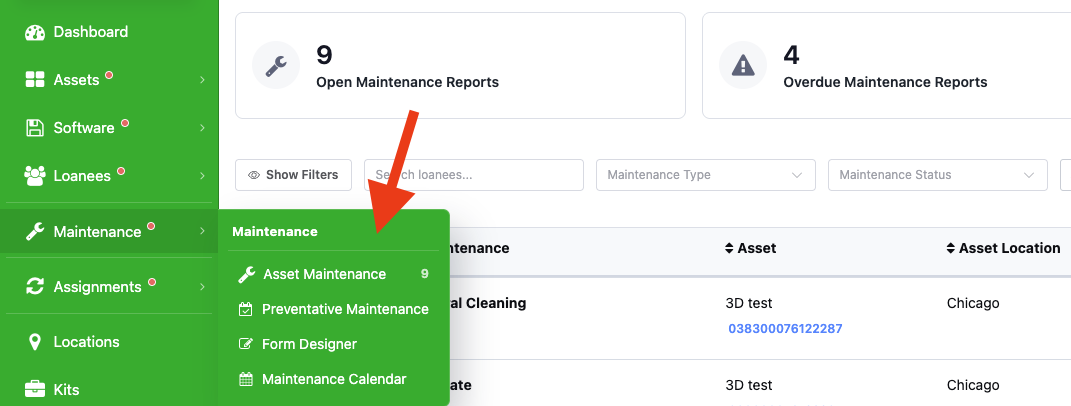
All live under the Maintenance (wrench) menu.
| Part | What it is for | Guide |
| Form Designer | Build the forms technicians fill in: checkboxes, text, menus, photos, consumables used. | Work orders and forms · Form PDFs · Images on forms |
| Asset Maintenance | The list of open and completed work orders; the menu badge is the open count. | Work orders and forms |
| Preventative Maintenance | Recurring schedules (daily to yearly, by weekday or day of month) that open work orders automatically for a set of assets. | Work orders and forms |
| Maintenance Calendar | Scheduled and open work by date and assignee. | – |
Automate around it
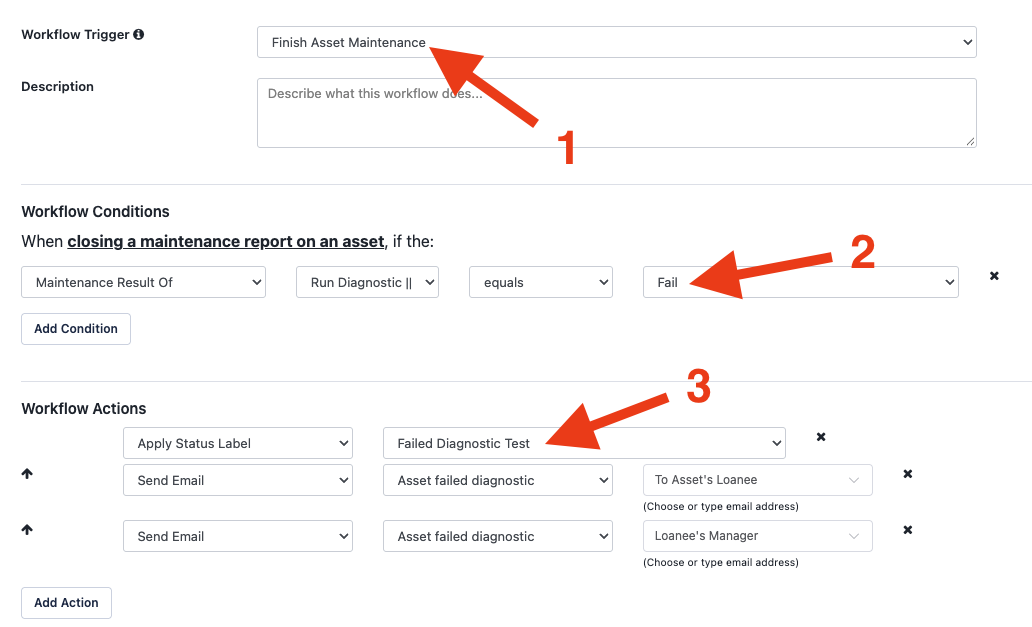
- Workflows trigger on Start Asset Maintenance and Finish Asset Maintenance — set the asset’s status label to In repair and back, or change it from a form answer — and on dates after close (1 month, 6 months, 1–2 years) for follow-ups. Status labels from maintenance fields · Workflows reference
- Email alerts have a Maintenance category for assigned, due and overdue work. Custom alerts
- Consumables logged on a form are deducted from stock. Consumables in work orders
- Check-out rules can hold an item until its cleaning or inspection work order is closed. Restrict loans until cleaned
Who can do what
If the wrench menu is missing, Maintenance is not enabled on your plan. Any user who sees it can start and complete work orders. Form Designer, Preventative Maintenance and the Calendar also need the Maintenance Editor permission on the user’s role (Settings → Users). The Display Asset Maintenance setting controls whether the Maintenance tab shows on asset pages.
Set it up in an afternoon
- Give form and schedule owners the Maintenance Editor permission.
- Build one form for your most common job in Form Designer — under ten tasks, with a photo task if condition matters.
- Start a work order on a real asset and complete it the way your technicians will (web or mobile); adjust the form.
- Add two workflows: Start Asset Maintenance → status In repair; Finish Asset Maintenance → status Available.
- Create a Preventative Maintenance recurrence for anything on a fixed cycle, and turn on the Maintenance email alerts.
Related guides
- How to Create Maintenance Work Orders and Schedule Maintenance in Reftab
- How to configure preventative maintenance in Reftab?
- How to Perform Maintenance with the Reftab App
- How do I create a Maintenance Form PDF?
- Adding Images to Maintenance Forms
- How to use consumables within a maintenance work-order form
- Use Automated Workflows to change Asset Status Labels based on Maintenance Fields
- How to Automate Pre-Trip Inspections
- Can I restrict items for loan until they are cleaned?
Looking for audits rather than maintenance — confirming an asset is where it should be? See How can I verify custody of assets?
Need help? We're here for you
For any questions or assistance, feel free to reach out to us.
Related FAQs
Ready to simplify IT asset management?
No credit card. No watered-down trial. Create a free account and see firsthand what Reftab can do.