
How to Merge Duplicate Loanees
In Reftab users can be sub accounts or loanees. If you have duplicated loanees, (for example many with the same email address) you can merge them into one sub user account.
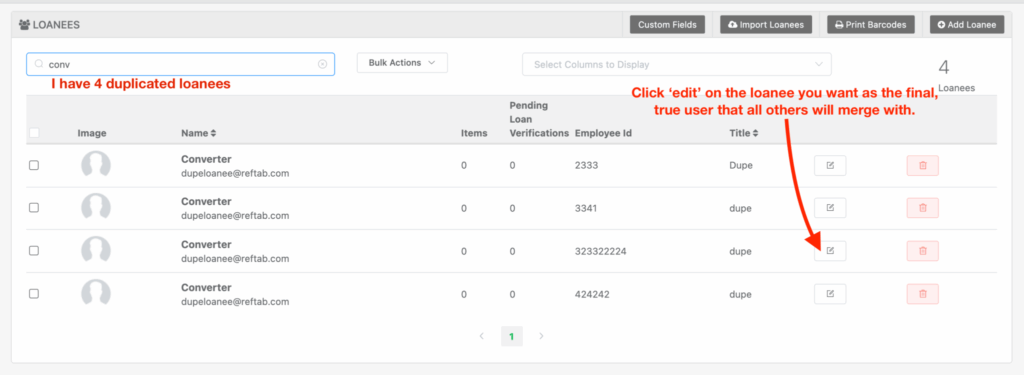
What you’ll need to do first, is find the loanee that you want to use as the final, true account and convert to a sub user account.
To do this, click “Edit” on the true loanee you’d like all others to merge with:
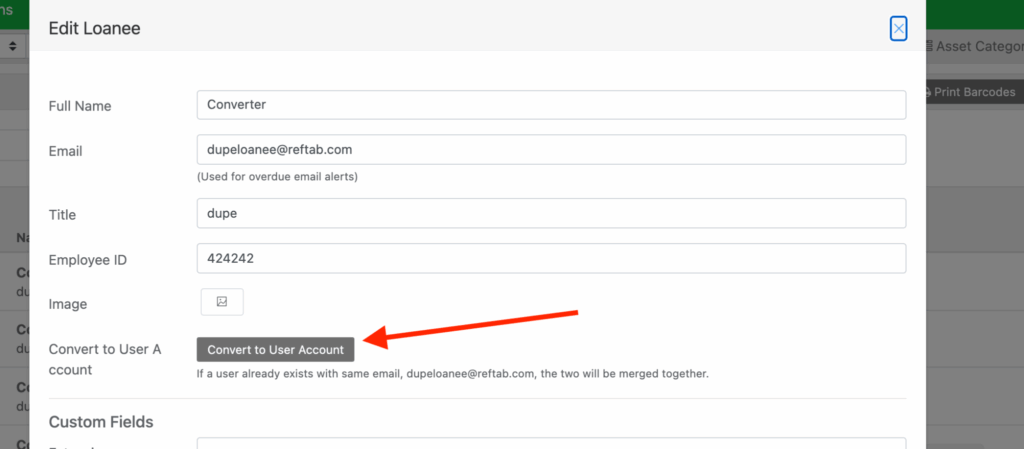
Click, “Convert to User Account”

Then, you’ll see that the loanee is now a sub user account. Next, we’ll convert all the other duplicated users into this one.

Next, click ‘edit’ on the rest of the loanees and merge them.

Click, “Convert to User Account” – the system looks at the current loanee’s email address and tries to match it to an existing sub user, when it finds one, the two are merged.
(Loanee details such as title, employee ID etc are not merged / do not overwrite to the sub account).
You’ll see the loanee’s gradually reduced, they will be merged into the sub user account. Any loans that a loanee has will also be transferred over to the sub user.

Need help? We're here for you
For any questions or assistance, feel free to reach out to us.
Ready to simplify IT asset management?
No credit card. No watered-down trial. Create a free account and see firsthand what Reftab can do.