
Why Don’t My Reftab Asset Counts Match My Asset Quota?
Quota Limit Reached but Showing Under Asset Limit
You may notice differences between the asset counts on the Assets page and the Locations page, or wonder why you’re at your quota limit even though the total count of assets appears lower. Most of the time, this is due to assets that were checked out and then archived, and never checked back in. But keep reading, this guide will help clarify how Reftab tracks and counts your assets.
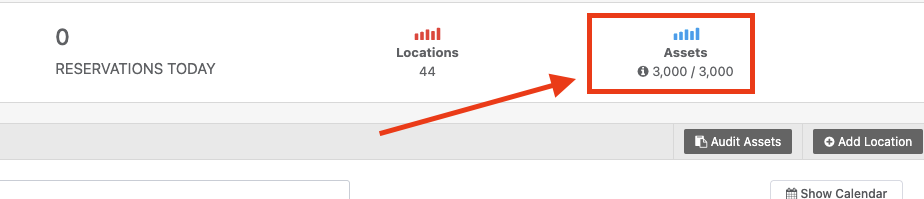
We’ll use an example of the locations page showing that a user has reached their quota of 3,000 assets.
Example: Locations page showing 3,000 assets, but the Assets page shows only 2,964 assets.
VS

The key is understanding how Reftab calculates billable assets. This is what your plan’s quota is based on.
Here’s a breakdown of what you’re seeing:
- 2,265 assets are currently checked out
- 676 assets are available to be checked out
- 23 assets are restricted from being checked out and are not currently checked out
- This totals: 2,964
But — the Locations page shows you’re at your 3,000 asset limit. Why?
Where are the “missing” assets?
The difference is due to 36 assets that were previously checked out and later archived using a status label that:
- Prevents check out, and
- Marks the asset as archived
Even though they are archived, these 36 assets are still checked out — and because of that, they still count toward your billable asset total.
📌 How does Reftab define “billable assets”?
Billable assets are shown on the Locations page and include:
- Assets that are currently checked out
- Assets that are available for check out
- Assets that are not checked out but still eligible for use (unless fully archived)
- Archived assets that are still checked out ← This is a common cause of confusion
How do I remove assets from counting toward our quota?
To fully archive an asset so that it does not count toward your quota, it must:
- Be saved with a status label that:
- Prevents check-out and
- Archives the asset
- Not be currently checked out
If an asset is still checked out, even if it’s archived, it will still count toward your quota.
👉 Check out this guide: How to Archive Assets in Reftab
✅ Quick Summary
| Page | What it Shows |
|---|---|
| Assets Page | Assets you can view and filter — does not include fully archived + inactive ones |
| Locations Page | Total number of billable assets counting toward your plan quota |
| Your Quota | Based on total billable assets (checked out, available, and archived-but-still-checked-out) |
Need help? We're here for you
For any questions or assistance, feel free to reach out to us.
Your assets, simplified. Begin your journey with us!
50 assets free forever with unlimited inventory & software tracking. Includes email alerts, mobile apps, reports, custom asset tags and more.