
How to update or change an asset image?
When viewing an asset that already has an image, you can remove the attachment or replace it with a new image:
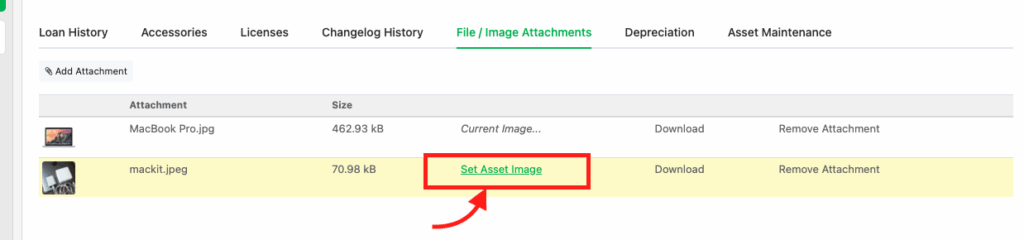
Click “File / Image Attachments” > “Remove Attachment”.
To upload a new image click “Add Attachment“

Once the attachment is removed, you can upload a new attachment and set it as the asset image. Click “Set Asset Image“
Delete Attachments
To remove a file entirely from Reftab, click “Settings” > “Manage Attachments”
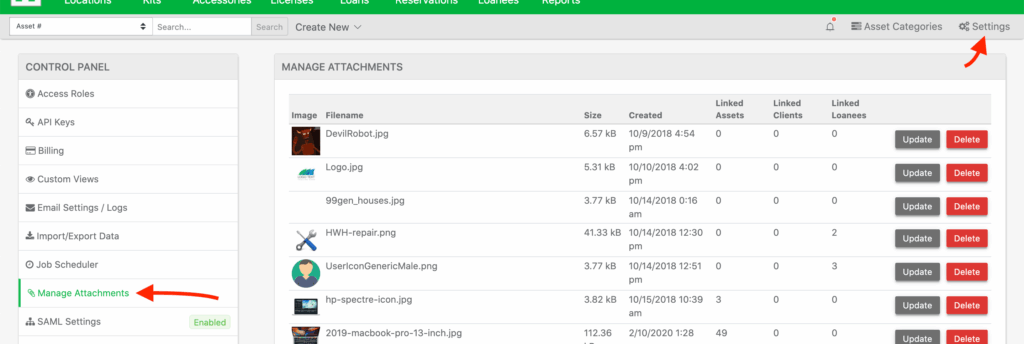
You’ll see a list of uploaded files, click “Delete” to delete the file.
Need help? We're here for you
For any questions or assistance, feel free to reach out to us.
Your assets, simplified. Begin your journey with us!
50 assets free forever with unlimited inventory & software tracking. Includes email alerts, mobile apps, reports, custom asset tags and more.