
Reftab’s Summer 2025 Release Notes
Table of contents

Happy fall everyone!
This release is mostly quality-of-life improvements, performance enhancements, and reliability updates. Much of the work in this cycle focused on “behind the scenes” refinements. These are things you may not immediately see, but that help make Reftab faster, more stable, and more consistent day-to-day.
New Features and Enhancements
1. Improved Asset Importer
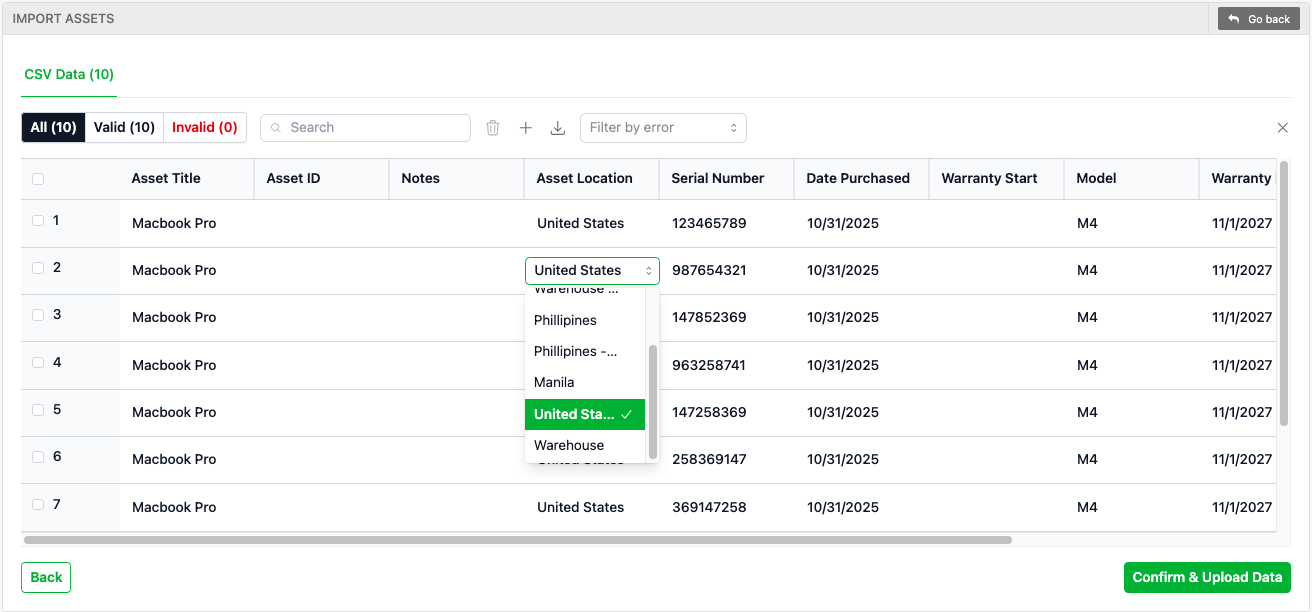
We’ve revamped the asset importer to remove a lot of the old frustrations. In addition to CSV, you can now upload Excel files (XLS and XLSX) directly.
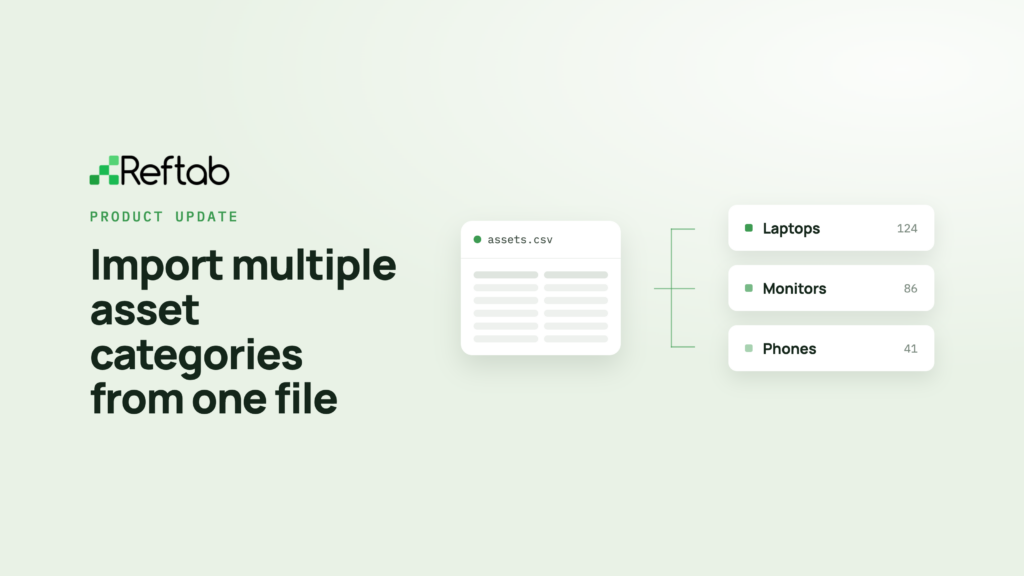
Update: Reftab now also supports importing multiple categories from one spreadsheet. Learn about the multi-category importer.
A major improvement is how we handle issues like duplicate or invalid values. Instead of having to exit the import, fix your spreadsheet, and re-upload — you can now edit and correct entries right inside the importer and continue without interruption.
This update is all about making imports faster, smoother, and far less tedious.
2. Bulk Attach Files to Multiple Assets

We’ve added a helpful enhancement to the assets table — you can now upload files to multiple assets at once using the bulk actions dropdown. Many teams need to attach important documents (like purchase orders, certifications, or warranty PDFs) across several assets, and this update makes that much faster and easier.
3. Upload Files from the Mobile App
The Reftab Mobile App now supports file uploads. You can select any asset and tap “File / Image Attachments” and upload a file from your device.
4. Change Asset Due Dates in Bulk Per User
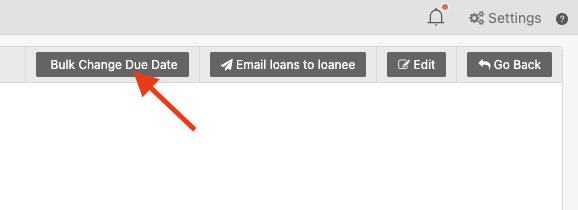
When viewing a user’s assigned items, you’ll see a new button in the upper right corner, “Bulk Change Due Dates”. This will allow you to set a new due date for all assigned items a user currently has.
4. SCIM Groups Now Visible on the Sub-Accounts Page
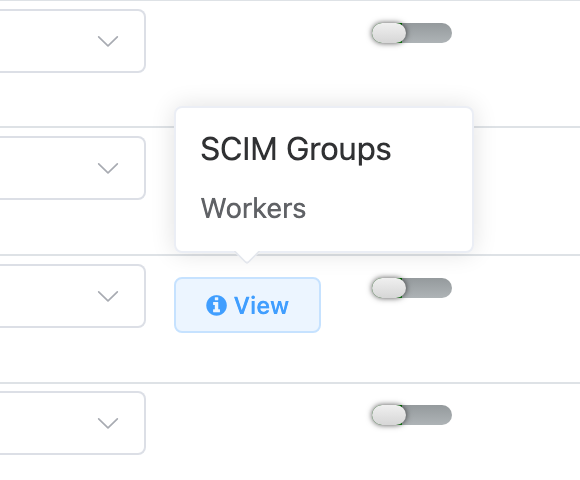
This update makes it easier to see which groups users belong to when they’re provisioned. Previously, some customers weren’t sure which groups were driving access role assignments, which could cause confusion. Now, when troubleshooting access roles, you can simply go to the Sub Accounts page to view exactly which groups each user is being provisioned from.
Integration Enhancements
1. Automatic Asset Reassignment for Intune & Jamf
Previously, when a device was reassigned in Intune or Jamf, Reftab would keep it assigned to the original owner to maintain manual control over check-ins. Now, you can enable a new option that automatically reassigns devices to the new user. If your workflows rely on keeping ownership up to date automatically, this will save time and reduce manual tracking.

2. Improved Intune Hardware Details
The Intune integration can now pull RAM and CPU architecture values. These details weren’t previously available due to Microsoft API limitations, so we had to change things up slightly / build custom logic to retrieve them without affecting performance.
3. Jamf Integration Now Captures OS Versions
The Jamf integration also got an upgrade. For a while we didn’t pull in OS version for Jamf devices because the values Jamf sent were essentially meaningless to users. Instead of displaying product IDs that weren’t meaningful, Reftab now translates those into the actual OS versions you expect to see.
Fixed Bugs:
- Custody Verification: Added functionality to close pending verifications when asset is checked in | (July 2025)
- Emails: Improved email replacement field for “Location Name” | (September 2025)
- Integrations: Improved Intune mapping when serial number is also used as the Asset ID. | (August 2025)
- Loans: Added function to update total loan counts when filtering for locations | (October 2025)
- Locations: Improved total asset counts to ignore archived assets | (October 2025)
- Maintenance: Added ability to bulk delete maintenance reports | (September 2025)
- Reports: Fixed reporting on maintenance fields that use “unchecked/checked” fields. | (August 2025)
- Software: Fixed title overlap on renewals calendar | (August 2025)
- Software: Updated MS license counts to ignore suspended licenses | (October 2025)
Recap from Past Release Notes
Reftab integrates with HR platforms!

By syncing with your HR system, Reftab automatically updates employee status and termination dates. This reduces reliance on manual tickets and helps your team stay ahead on offboarding and asset collection.
Here is a guide on how to integrate your HR system with Reftab
Reftab now integrates with Slack and MS Teams

Integrating Reftab with Microsoft Teams or Slack helps keep everyone aligned in the tools they already use. Important alerts can be delivered directly to your channels, reducing missed follow-ups and speeding up response times.
Reftab Integrations with Microsoft 365

Connecting Reftab with Microsoft 365 is quick and easy. Once integrated, you get a clear, centralized view of who’s assigned to what all form within your Reftab platform.
Reftab Integrates with Adobe

Integrating Reftab with Adobe is fast and seamless. It lets you see software usage alongside your hardware all in one place, making IT management simpler and more connected than ever.
Summary and Upcoming Features
We’re taking Reftab to the next level by expanding beyond hardware tracking to give you full visibility into both software and hardware assets. Exciting features are coming soon, including:
- Xero Integration
- One of the best ways to manage SaaS spend is by utilizing data from finance tools. Xero is the first on our list and development is well underway. If your organization uses a finance tool and you’re interested in integrating it with Reftab, please let us know!
- Reftab Browser Extension
- With a Reftab Browser Extension, IT teams can make automated app discovery effortless, and help eliminate blind spots, without any manual work. We’re designing it to be incredibly easy to deploy while keeping privacy front and center. If you’d like to be a beta tester, let us know!
Thank You!
Huge thanks to our amazing users, your feedback drives the tools we build and ensures they meet your real-world needs. Reftab is dedicated to being the world’s leading platform for managing both hardware and software assets within one tool and we couldn’t do it without your help.
Got ideas? Drop us a line at help@reftab.com

Michael Plocher
Table of contents
Your IT inventory, finally under control
Try Reftab for free, no strings attached. 50 assets free forever.
Your assets, simplified. Begin your journey with us!
50 assets free forever with unlimited inventory & software tracking. Includes email alerts, mobile apps, reports, custom asset tags and more.