
Summer 2026 Release Notes
Table of contents
Our latest updates include features to support compliance, new integrations, software management enhancements, and more.
As always, we appreciate any feedback you have — our goal is to ship what matters to you.
New Feature: Access Reviews
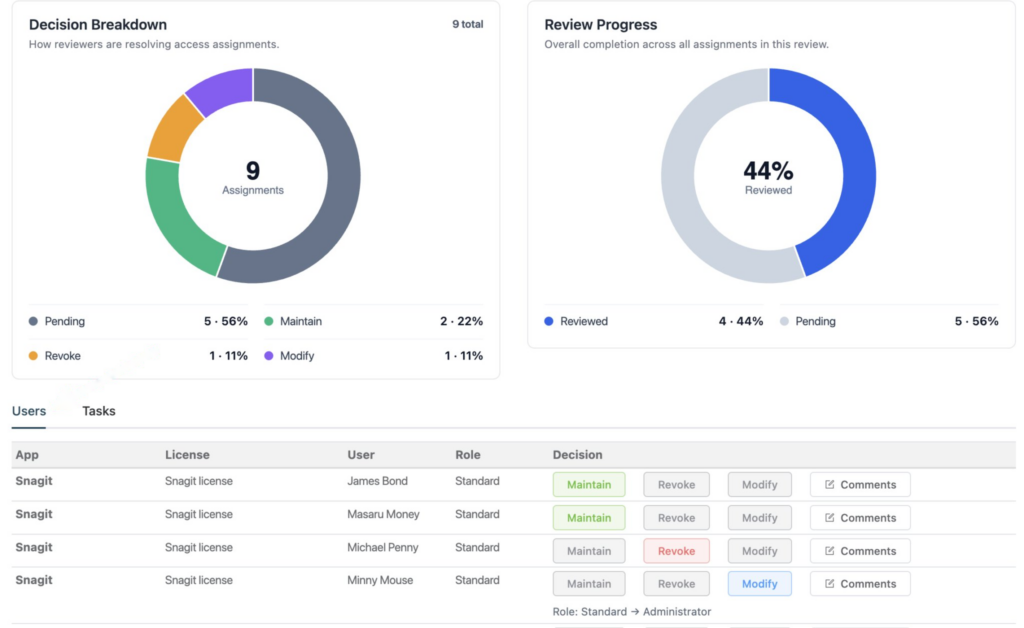
If your organization is working toward SOC 2 or ISO 27001 certification, access reviews are a required control — and until now, there was no native way to run them inside Reftab. That changes with Access Reviews.
You can now create structured review workflows directly from the Software tab: assign a review owner, let them work through each user’s access and mark it as maintained, revoked, or modified, and then export a timestamped Excel report that documents every decision. That export is your audit evidence — it shows who reviewed access, what they decided, and when.
Reftab also generates follow-up tasks automatically for any revoke or modify decisions, so nothing falls through the cracks between the review and the actual access change.
Integrations
New Integration: Xero
Reftab now integrates with Xero, automatically importing your software licenses so your asset data stays in sync with your accounting records. Note: this integration imports license data only and does not create new asset records in Reftab. Read the Xero guide.
New Integration: Fleet DM
Reftab now integrates with Fleet DM, syncing device data from your Fleet-managed endpoints directly into your asset inventory. Read the Fleet DM guide.
New Integration: Retriever
Reftab now integrates with Retriever, letting you trigger a device return directly from any asset or user record without leaving Reftab. Enterprise Retriever plan required. Read the Retriever guide.
Integration Enhancements
- Google Workspace: Sync Assets by Org Unit
- Google Workspace: Auto-Reassign Assets on Person Change
- Lansweeper: Multiple Tenants Supported
- Intune: Enable/Disable Autopilot Device Processing
- NinjaOne: More Asset Categories
- Kandji: Supported Iru Rebrand
- Kandji/Iru: New Auto Reassign Assets Setting
Want to unlock these features (and much more)? Integrations are available with Business and Enterprise plans. Book a call with our team or review pricing to see which plan is right for your team.
Software Management
SaaS Discovery — Domain Grouping
The browser extension tab now groups domains by application, so subdomains and login variants appear together under a single app — rather than as separate rows. The “First Discovered” column has been replaced with “Last Seen,” making it easier to see the applications your team is actually using today.
License Billing – Historical Billing
You can now add historical billing records to a license, and Reftab will automatically recalculate costs for the affected billing cycle or year. Useful for backfilling accurate spend data when a license was added to Reftab after billing had already started. Read the guide.
License Billing — One-Time Charges
You can now add one-time charges to a license — such as an onboarding fee or setup cost — separately from recurring billing. This gives you a more accurate picture of total software spend without inflating your recurring cost calculations.
Mark License/App as Decommissioned
Licenses and applications can now be marked as Decommissioned, which removes them from your Renewals dashboard without deleting them from your records. If circumstances change, decommissioned items can be marked active again at any time.

Rachel Szarka
Table of contents
Your IT inventory, finally under control
Try Reftab for free, no strings attached. 50 assets free forever.
Continue reading
Your assets, simplified. Begin your journey with us!
50 assets free forever with unlimited inventory & software tracking. Includes email alerts, mobile apps, reports, custom asset tags and more.