
How to Track Software Licenses in Reftab
Why Reftab Instead of Spreadsheets?
Why should I move away from spreadsheets to track software licenses?
Spreadsheets break down fast. They go stale the moment someone forgets to update them, they can’t send renewal alerts, they can’t tell you who’s using what, and they give you no visibility into waste. Reftab keeps license data live — automatically syncing from your identity providers, MDMs, and browser extensions — so your records reflect reality, not last month’s manual audit.
What’s the advantage of tracking software licenses alongside hardware in the same platform?
Context. When you can see that a user has an assigned MacBook, an Intune enrollment, a Slack seat, and an Adobe license all in one profile, you can make better decisions. Offboarding becomes a checklist you can actually trust — you know what to revoke, what to reassign, and what hardware to recover. Procurement gets cleaner too: you can spot redundant tool overlap across teams, or catch cases where a $50/month app is assigned to a device that’s already been retired.
This guide will cover:
- Getting Software Into Reftab
- License Seats & Assignments
- Renewals & Expiration Alerts
- Spend Management
- Access Reviews
- Automation
- Vendors
Getting Software Into Reftab
How do I add a software application to Reftab?
Go to Licenses → Applications and create a new application record. You can assign a vendor, category, security certifications (SOC 2, HIPAA, GDPR, etc.), and link it to one or more license records. Applications move through a built-in status workflow: Discovered → Pending Review → Approved → In Use → Inactive/Decommissioned.
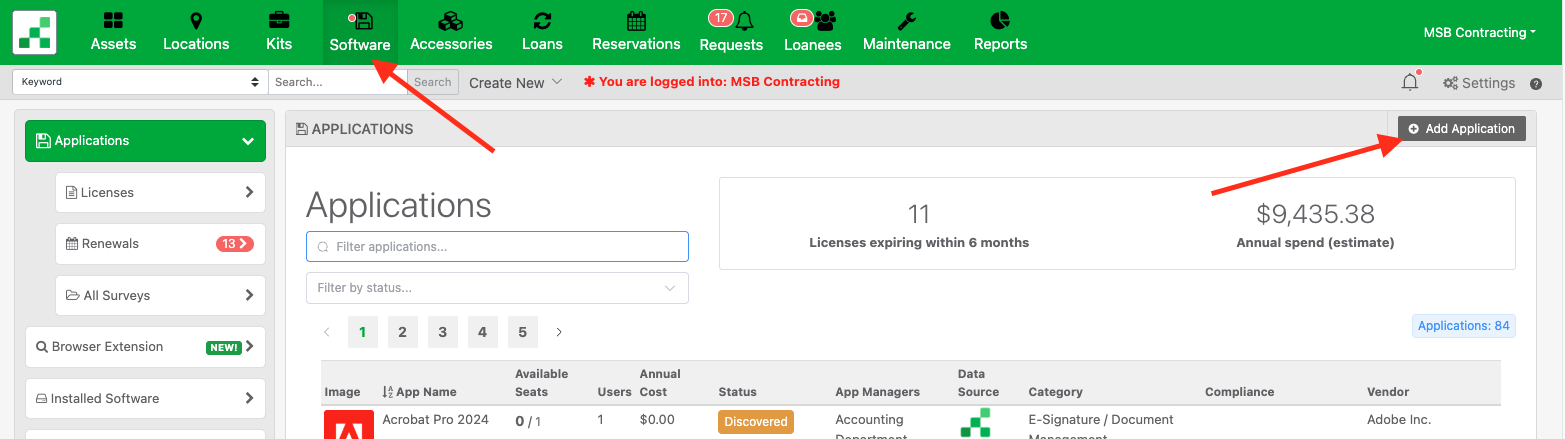
Click “Software” > “Add Application”
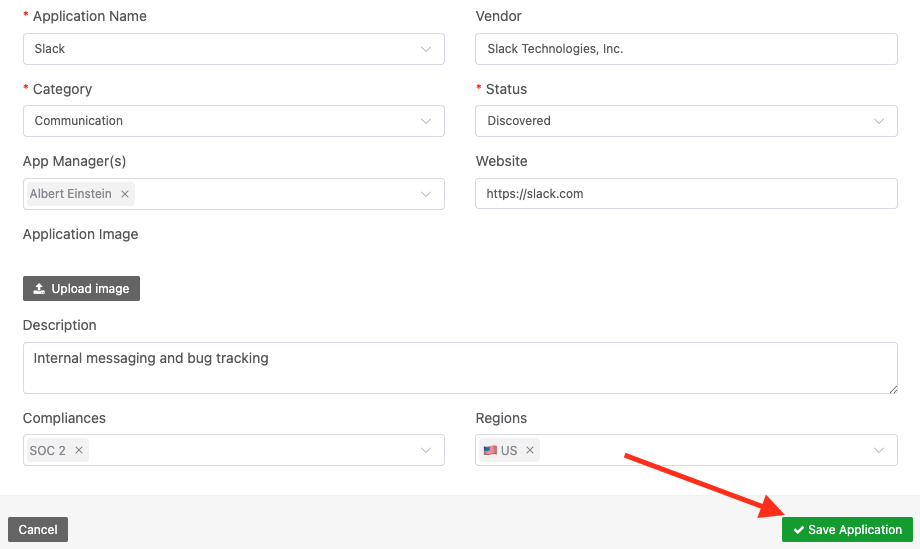
Next, add the application and details and save.
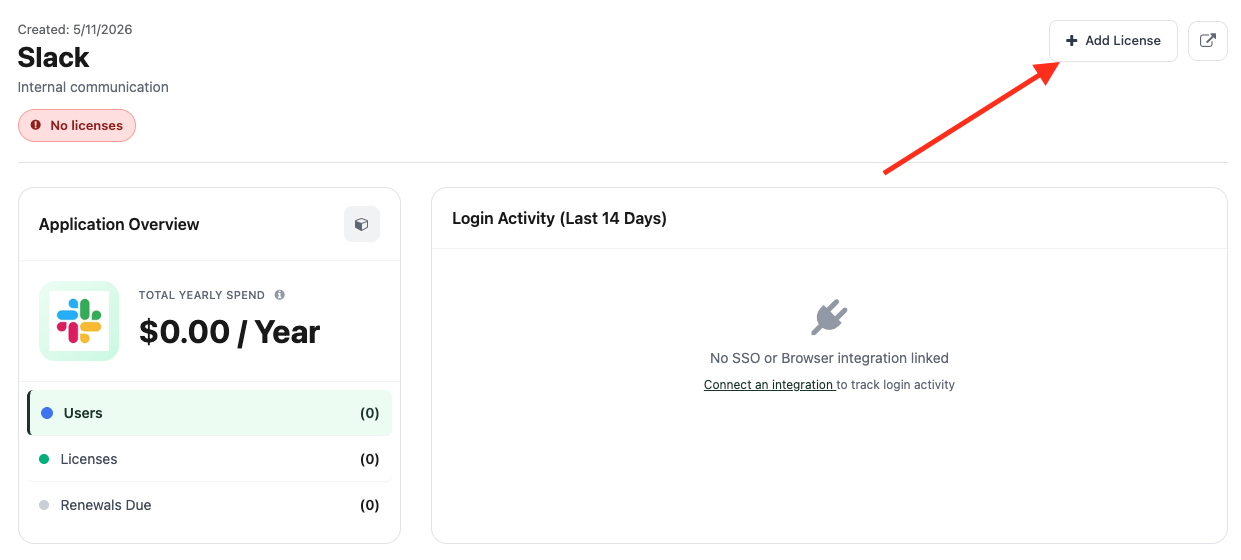
When saved you can add a license by clicking “Add License“
Here is where you can name the license type, set seat count, renewal dates, alerts, and any other custom fields you need such as department, etc.
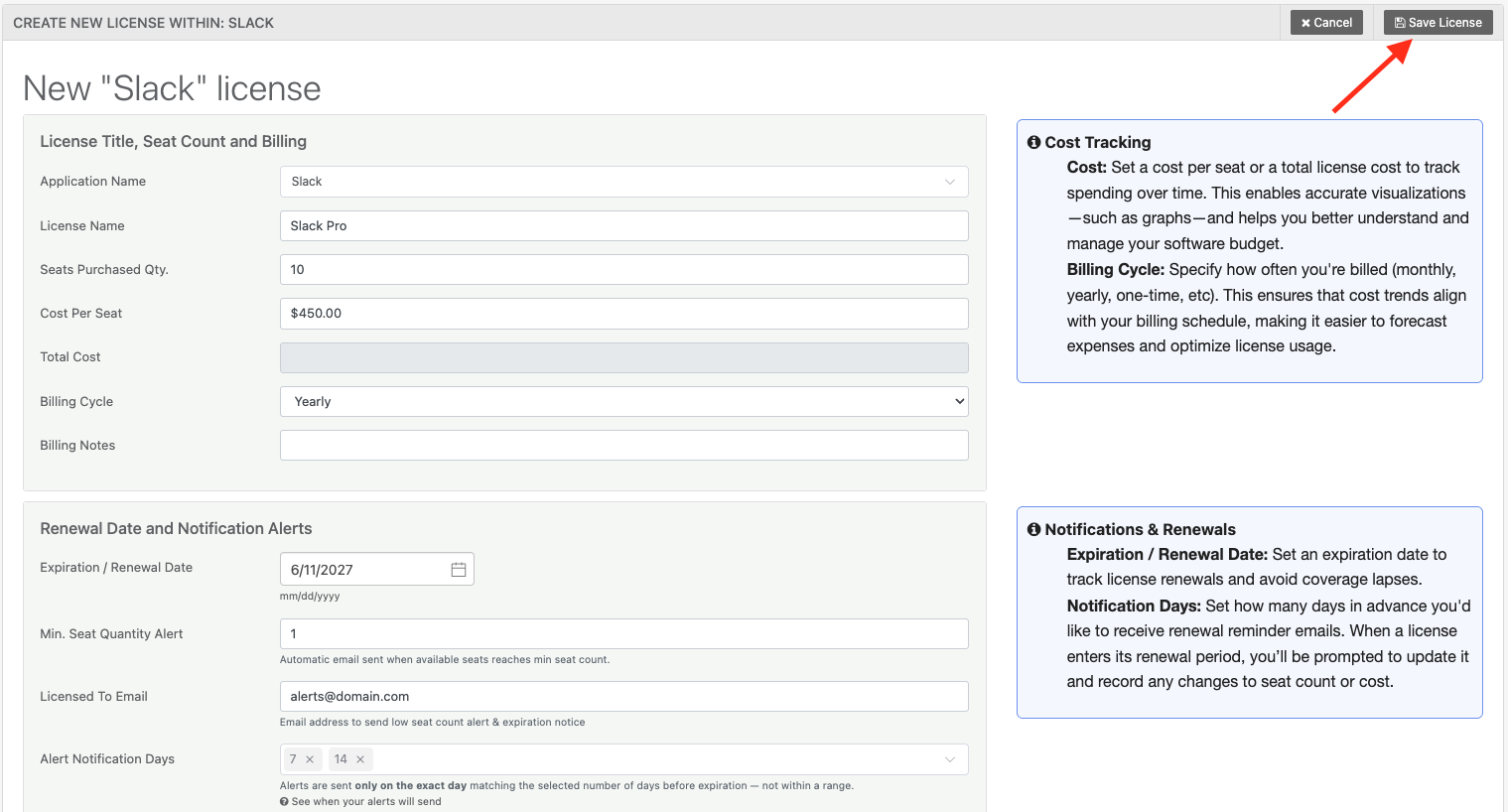
Click “Save License” when done.
Do I have to add software manually?
No. Reftab discovers software automatically through multiple sources:
- Browser Extension (Chrome/Firefox) — detects SaaS apps employees are actually logging into
- MS Entra — surfaces apps your users are authenticating against
- Okta — pulls your full SaaS application catalog and user assignments
- MDMs (Jamf, Intune, NinjaOne, Kandji, Lansweeper, etc.) — reports installed software per device
- Adobe— dedicated integrations for license data
- Xero -Track spend data automatically
Discovered apps land in a review queue. You can approve them, ignore them, or convert them directly into tracked license records.
What is “Discovered Users” on an application?
When Reftab detects that a user has logged into or been granted access to an application (via browser extension, Azure, or Okta), that user appears in the application’s Discovered Users list. You can see who’s tracked vs. untracked, review first-seen dates, and bulk-convert them into assigned license seats.
An untracked user is someone detected as accessing the application but not yet assigned a seat in Reftab.
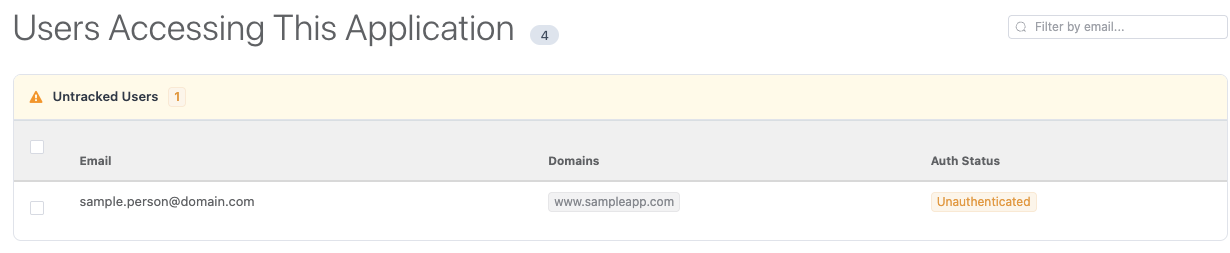
A tracked user is someone detected as accessing the application and has an assigned seat in Reftab.

License Seats & Assignments
How do I assign license seats to users?
From any license record, use the Checkout button to assign seats to individual users. You can assign in bulk, set start and end dates, and add notes. The license record automatically tracks available vs. consumed seats in real time.
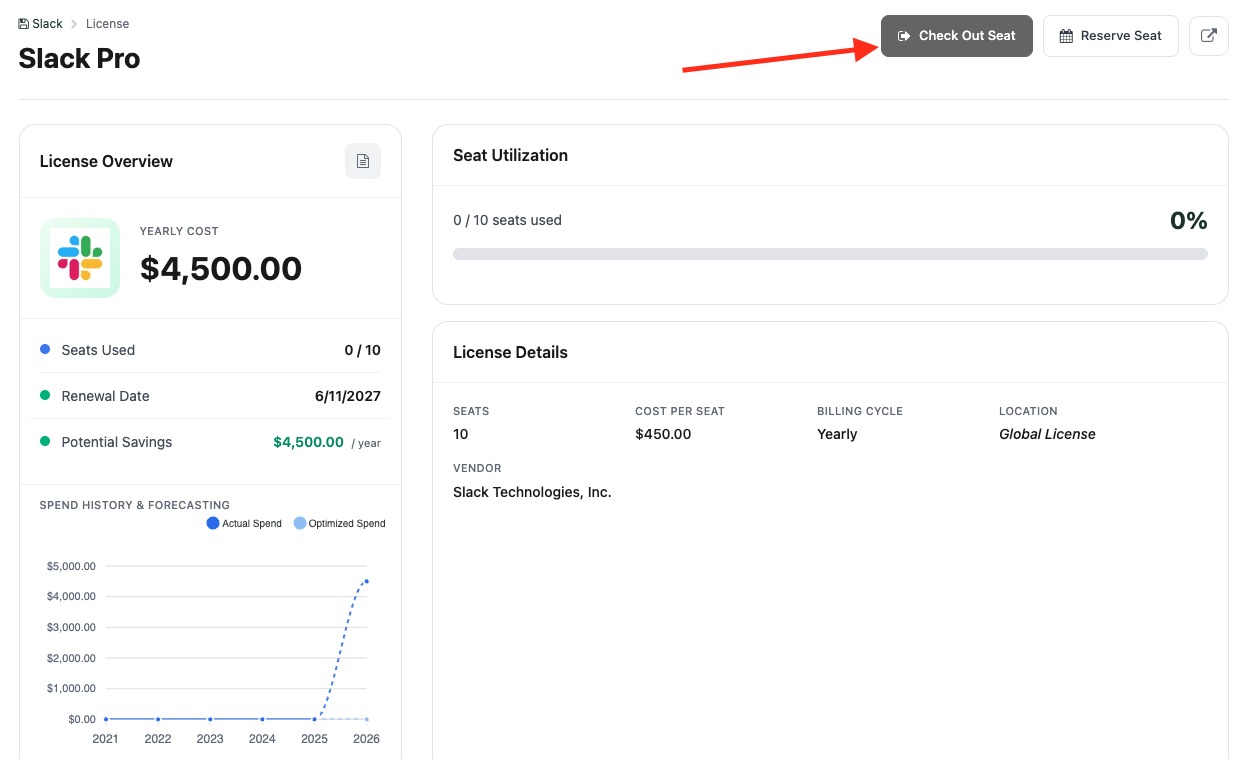
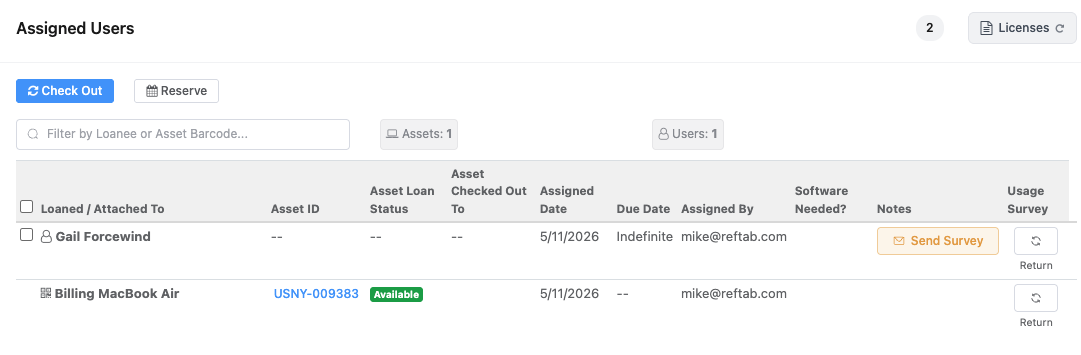
Once a seat is assigned, you can review the “Assigned Users” table at bottom.
What license models does Reftab support?
- Per-seat (named user), with cost per seat tracked individually
- Total cost (flat license fee, not per-seat)
- Minimum seat thresholds with low-availability alerts
- Monthly, quarterly, and yearly billing cycles
Can I link a license to a specific device?
Yes. Licenses can be assigned to assets (devices) directly from the asset record, and you can see all licenses tied to that device in one place — including historical assignments and revocations.
What happens if I run low on seats?
Reftab alerts you when available seats fall below a configured threshold so you can act before users hit a wall.
Renewals & Expiration Alerts
How does renewal tracking work?
Each license has a renewal record where you set the expiration date, billing cycle, and notification days. Reftab sends automated email alerts at whatever lead times you configure (e.g., 90 days, 30 days, 7 days before expiry). You can also log renewal history — new seat counts, updated costs, invoice numbers — so you have a full audit trail.
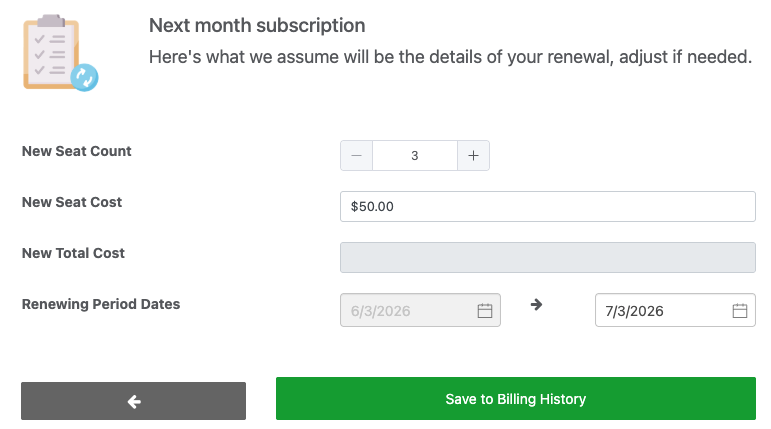
When viewing a license that is within the renewal period, you’ll see a button to “Renew now”
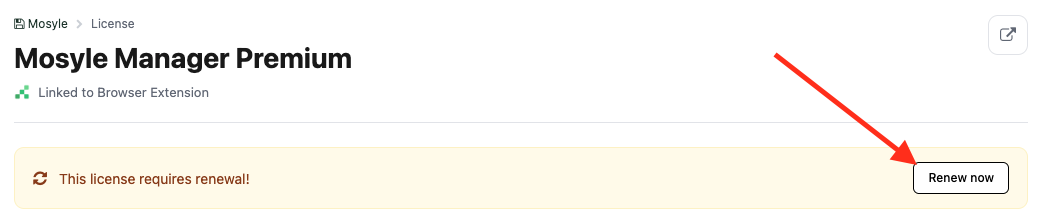
From here you get to review past details, right size anything that needs adjustment and set the upcoming renewal specifics:
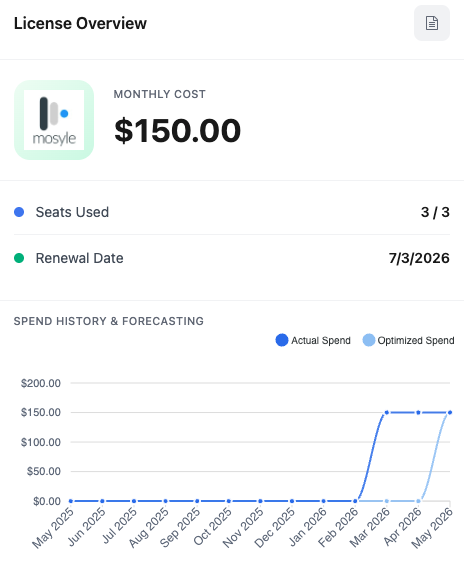
When saved, you’ll see the spend chart update and the renewal dates update:
Where can I see all upcoming renewals at once?
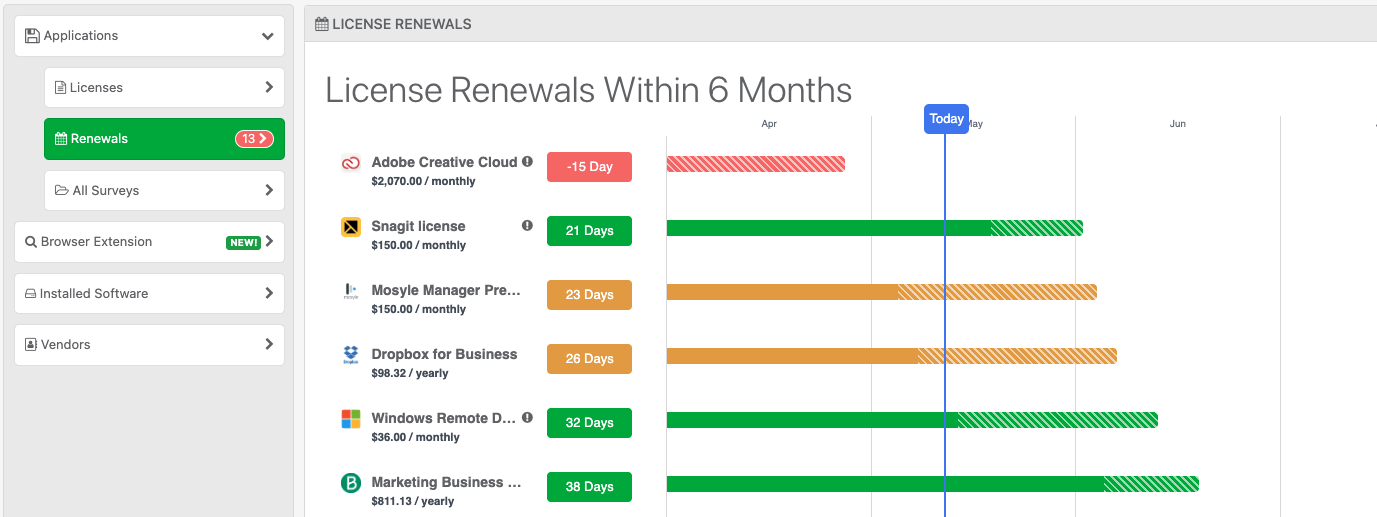
The Application Renewals view gives you a timeline-based calendar of upcoming expirations across all your licenses, with urgency indicators. Finance and IT ops can both use this to plan ahead without hunting through individual records.
Can I project what my renewal will cost?
Yes. When logging a renewal, you can enter projected seat counts and costs side-by-side with current values, so you can model increases before committing.
Decomission Applications and Licenses
Can I decommission an application without loosing historical data?
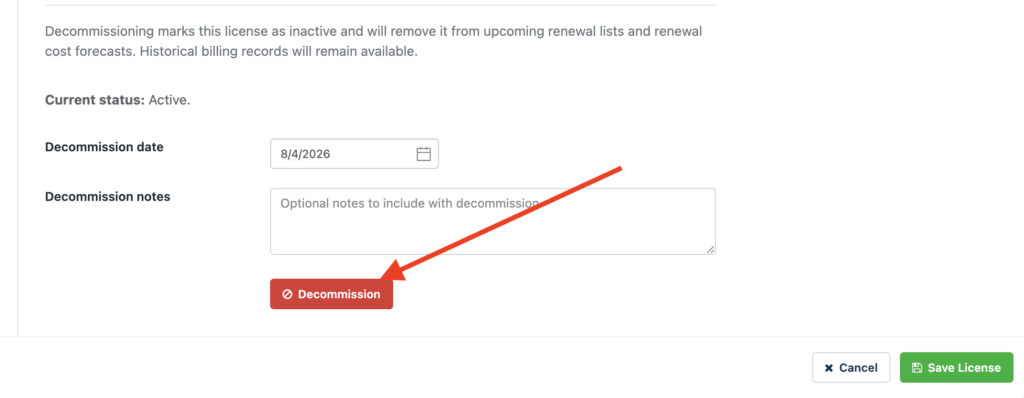
Yes, Decommissioning marks a license as inactive and will remove it from your upcoming renewal lists and renewal cost forecasts. Historical billing records will remain available.
Go to any application and click into any of it’s licenses. Click “Edit” and then click “Additional Details“
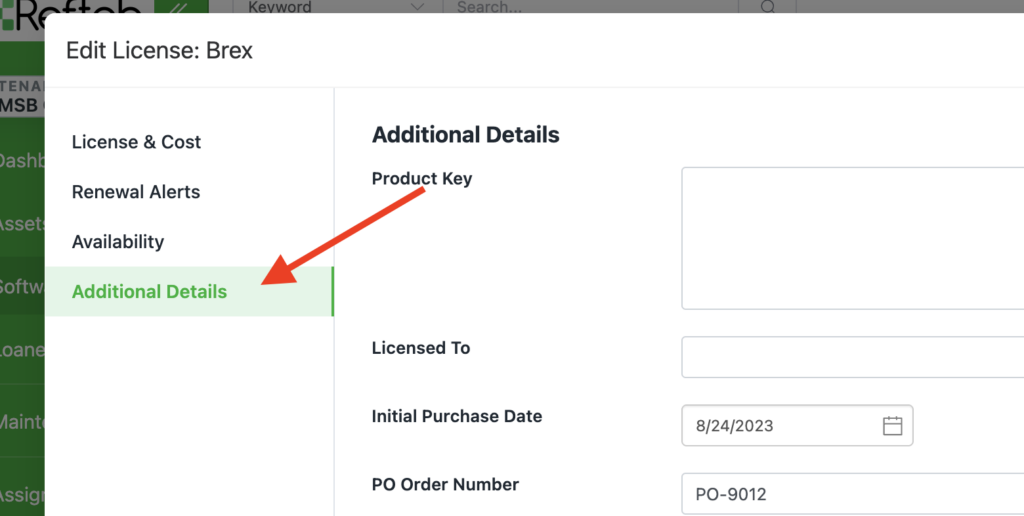
Next, scroll to the bottom and click “Decommission“
You’ll then see a notice stating it was decommissioned along with a date timestamp.
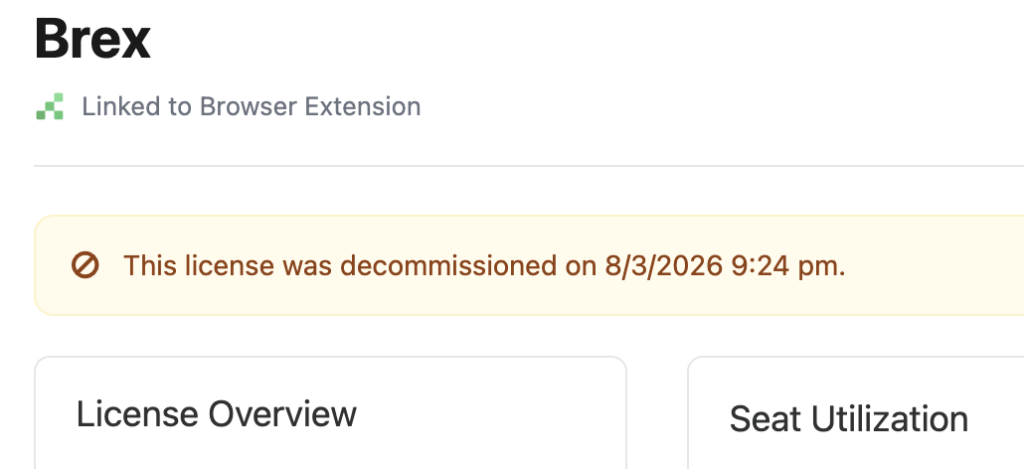
To mark it as active, simply edit the license, click “Additional Details” and mark it as active.
Spend Management
How does Reftab help me manage software spend?
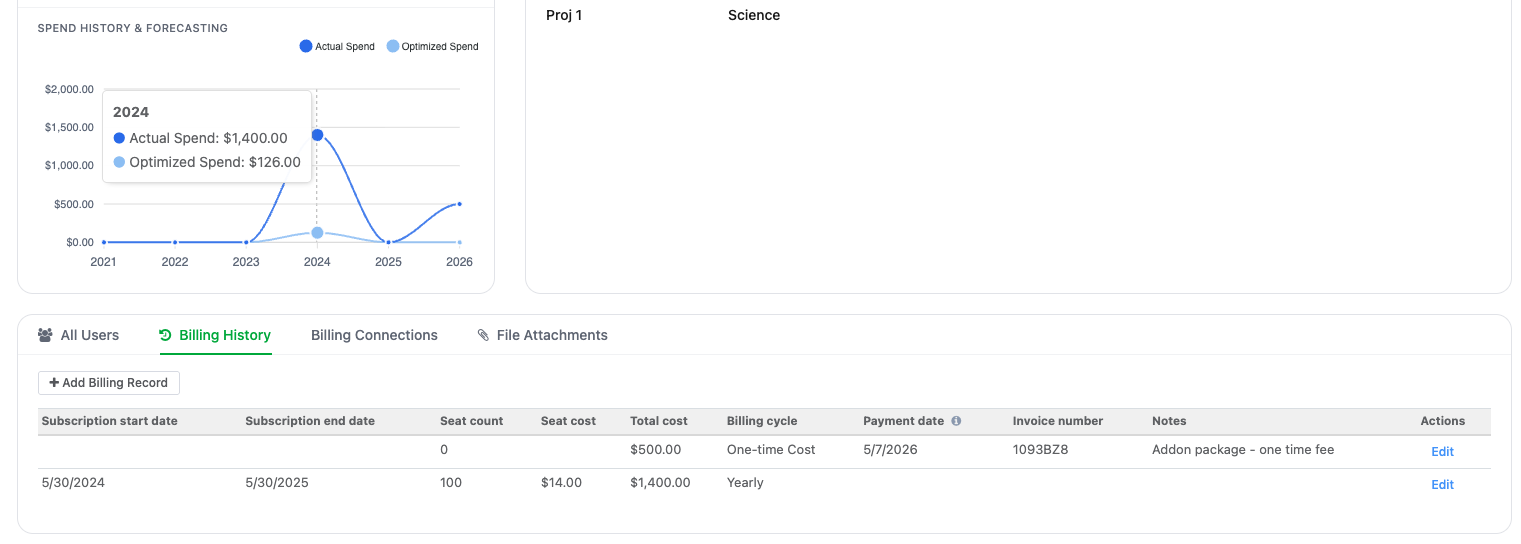
The spend chart aggregates actual vs. projected costs across your license portfolio — broken down by month, quarter, or year. You can see where money is going, identify waste (licenses with no active users), and model optimized spend based on actual usage data. Billing history is tracked per license with line items, invoice numbers, and period breakdowns.
Does Reftab integrate with accounting tools?
Yes — Reftab connects to Xero for billing data, and you can import invoices and line items directly into license records. CDW is also supported for procurement data.
Can I add one-off charges to software licenes?
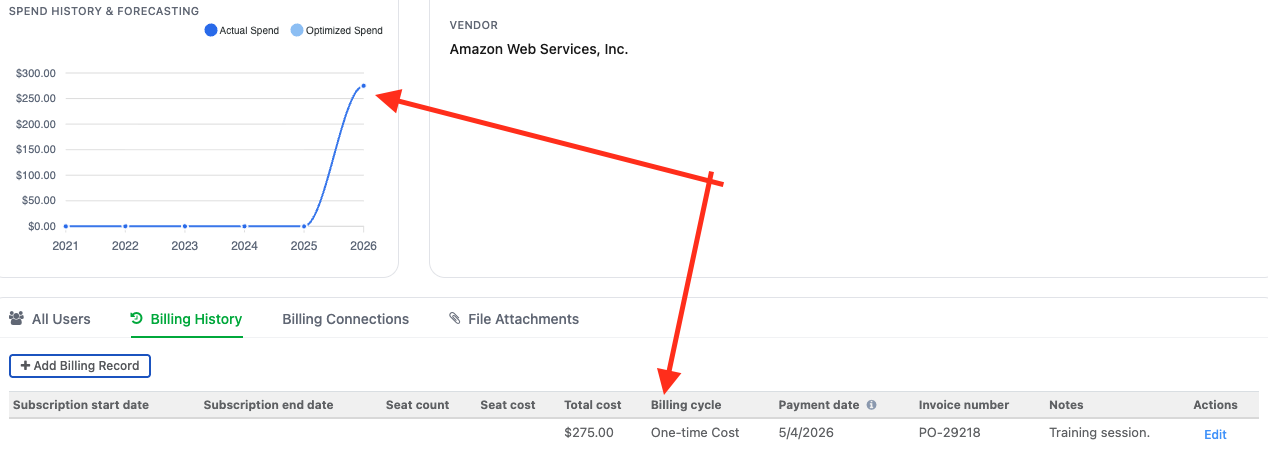
Yes – you have the option to manually add a historical payment. You can choose “Subscription” or “One time charge“
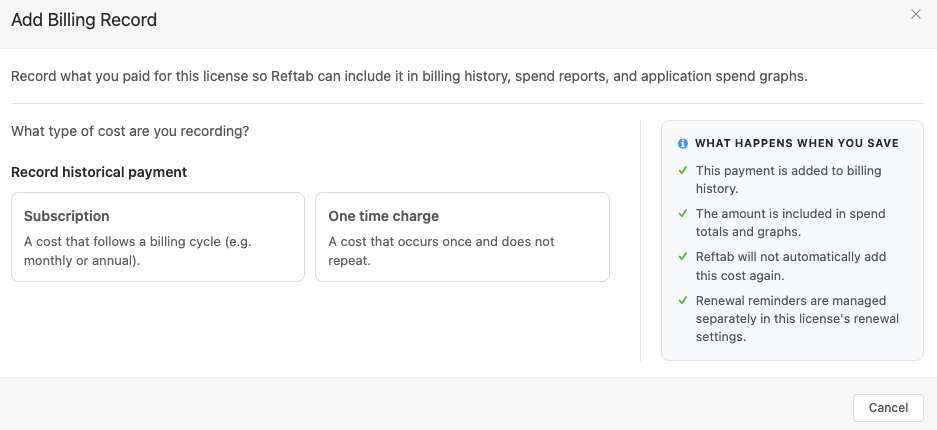
For example, if you added a One time charge to track a training or support session, this will be recorded, then reflected in your spend history:
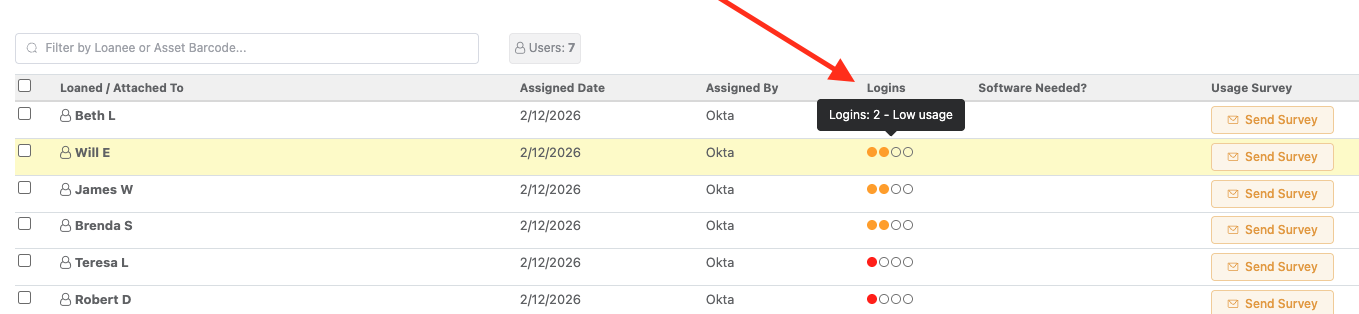
How do I find licenses nobody is using?
Cross-reference your license assignments against the Discovered Users data. If a license has 50 seats but only 20 users have logged in recently, that gap is visible — and actionable.
Access Reviews
Can I do access reviews in Reftab?
Yes. Reftab has a built-in survey system for license attestation. You send surveys to users asking whether they still need access to a given application. Responses are tracked as: Yes (still needed), No (can be revoked), Pending, or Cancelled. Results are tabulated and reportable.
How do I trigger an access review for an individual user?
From a license record’s loan table, you can send surveys to assigned users.
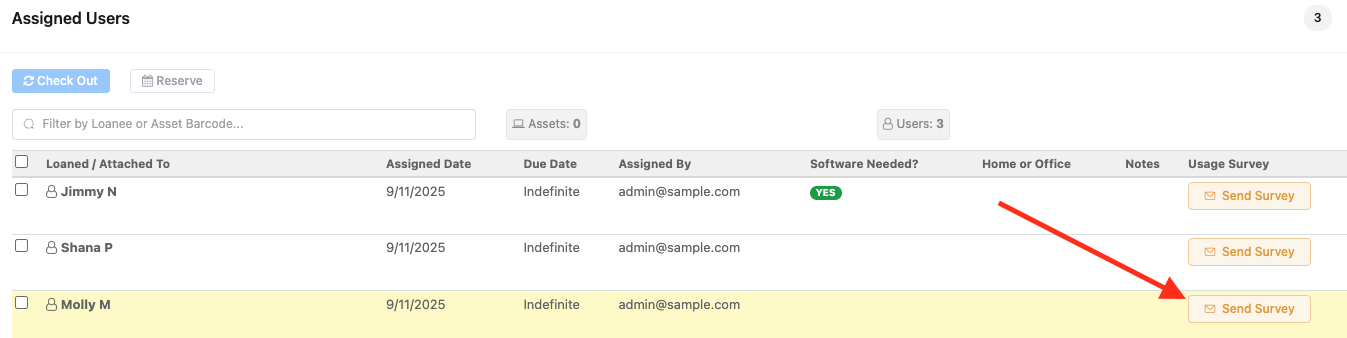
For more details on configuring your survey see our guide here: https://www.reftab.com/faq/license-surveys-how-to
Access Reviews and Compliance Reporting – IGA (Identity Governance and Administration)
Reftab includes an Access Review process to help application owners, managers, and admins review who has access to specific software applications.
This is different from asking end users directly whether they still need a license. Instead, Access Reviews are designed for internal reviewers, such as app owners or managers, to confirm whether each user should keep their current access, be downgraded, or have access revoked.
These reviews can help support security and compliance requirements for frameworks such as SOC 2 and ISO, where organizations may need to show that access is reviewed on a regular basis.
Reftab will save completed reviews, including the users reviewed, decisions made, requested changes, and timestamps. This gives organizations a clearer record of when access reviews were performed and what actions were taken.
Automation
What can Reftab automate?
Reftab can automate many of the routine tasks involved in managing software licenses, users, renewals, and reporting.
Common automations include:
- Renewal alerts — notify your team before licenses or contracts are set to renew.
- Low seat quantity alerts — get notified when available license seats are running low.
- User assignment and removal — automatically assign or remove software seats based on integrations, user activity, or access data.
- Scheduled reports — deliver reports automatically to the right people on a recurring schedule.
- Billing history and spend tracking — integrations with tools like Xero and other applications can help automate software spend records, billing history, and renewal cost tracking.
These automations help reduce manual work, keep software records more accurate, and give teams a clearer view of license usage, costs, and upcoming renewals.
Does Reftab sync users automatically?
Yes. Via SCIM, Reftab auto-provisions and deprovisions users as they join or leave your organization. Azure AD and Okta both support this, meaning your license assignments can stay in sync with HR changes without manual cleanup.
What about Azure group-based license assignment?
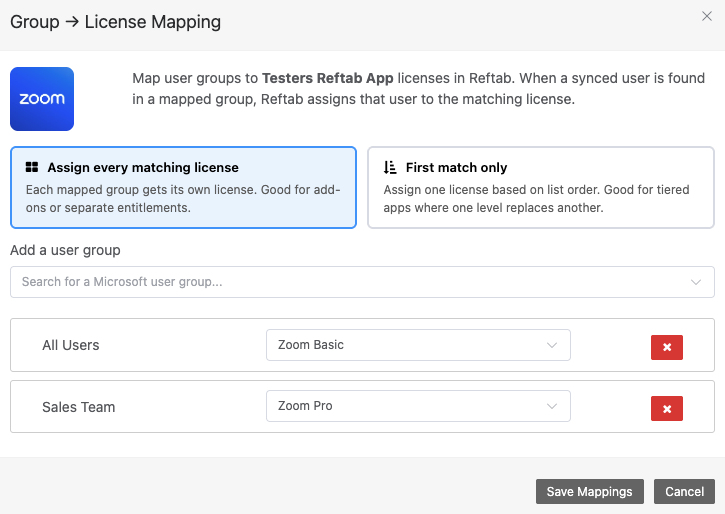
Reftab’s Azure integration lets you map Azure AD groups directly to license seats. When a user joins a group, they’re automatically assigned the corresponding license. You can configure per-group seat overrides and manage the mapping from the Azure Discovery panel.
Vendors
Can I track vendor relationships in Reftab?
Yes. Each vendor record stores legal name, website, account number, address, and multiple contacts (sales, support, account manager). Vendors link to applications and licenses, so you always know who to call for a renewal or support issue.
Integrations Overview
Which integrations feed into software license tracking?
| Category | Integrations |
|---|---|
| Identity / SSO | Azure AD, Okta, SAML, SCIM |
| MDM / Endpoint | Jamf, Intune, NinjaOne, Kandji, Lansweeper, Meraki, Mosyle, Zentral, Fleet DM |
| Procurement | CDW, Adobe, Xero |
| HR / Provisioning | Finch, SCIM |
| Browser Discovery | Chrome Extension, Firefox Extension |
| Ticketing | Zendesk, Jira |
Reporting
What license reports are available out of the box?
Reftab ships with pre-built templates for licenses on loan, disabled users with active assignments, users with no recent activity, overdue checkouts, and more. All templates are fully customizable in the report designer, where you pick fields, apply filters, and schedule delivery.
Can I build a custom software report?
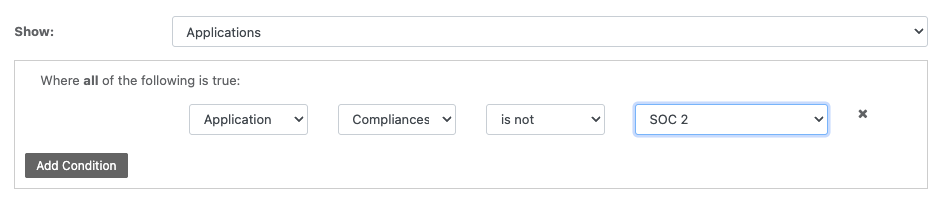
Yes. The report designer lets you select any license, application, or user field, apply conditions, and save the report for future use or scheduled distribution.
Reftab gives you a single system of record for both hardware and software — with real discovery, real automation, and real cost visibility. No more chasing spreadsheets before a renewal or guessing who has access to what.
Need help? We're here for you
For any questions or assistance, feel free to reach out to us.
Ready to simplify IT asset management?
No credit card. No watered-down trial. Create a free account and see firsthand what Reftab can do.